

Artificial intelligence is already close to you, but it usually appears as a quiet layer inside ordinary products rather than as a visible robot. It helps rank search results, filter spam, improve phone photos, predict traffic, recommend products, detect suspicious transactions, translate speech, and generate text or images. The practical question is no longer whether you interact with AI, but which decisions you should let it assist and which ones still need deliberate human checking.
That distinction matters because “AI” covers many different systems. Some recognize patterns or make predictions, some generate new content, and some can take actions inside a defined workflow, so two products described as “AI-powered” may behave very differently. If you want the foundations first, start with AI basics, then use this guide to identify the systems that are already woven into daily life.
What Does “Artificial Intelligence Close to Us” Actually Mean?
An AI system takes inputs and infers an output such as a prediction, recommendation, generated response, classification, or decision. That output can influence something digital, such as what appears in your feed, or something physical, such as how a vehicle assistance feature responds to surrounding traffic. The useful way to think about AI is therefore not as a single machine, but as a family of systems that turn data into assistance, ranking, prediction, generation, or action.
This is why AI can feel invisible even when you use it repeatedly. A spam filter does not announce that it has classified an email, a navigation app does not show every traffic prediction behind a route, and a camera app may improve an image before you see the final photo. The visible interface may look ordinary while an AI model is doing part of the work in the background.
Where AI Is Hiding in Your Daily Routine
You can usually find everyday AI by looking for moments when software recognizes, predicts, recommends, ranks, generates, or automatically adjusts something. The system may be running on your device, in the cloud, or across both, and the user interface may never label the process clearly. The examples below show the most common places where AI is already close enough to affect an ordinary day.
See where AI is already working around you
AI Around You
Reality Check
Select the parts of daily life you use, identify what the software is doing, and get a practical verification and privacy checklist based on the stakes.
Start with your real routine. This experience does not claim that every selected service definitely uses AI. It helps you identify where AI is commonly used, what function it may perform, and what questions are worth asking before you rely on the output.
Your everyday-AI snapshot
What to notice next
contexts
Likely AI jobs in view
Verification level
Privacy checkpoint
Four questions before AI influences an important decision
- What is the system doing? Is it recognizing, predicting, generating, recommending or acting?
- What data is it using? Check permissions and whether sensitive information leaves your device or organization.
- What happens if it is wrong? Raise the verification level as consequences rise.
- Can a person check or override it? Keep a reliable human path for consequential decisions.
Educational decision support only. This experience does not determine whether a specific product uses AI, whether an AI system is safe, or whether an automated decision is correct.
1. Your phone camera, keyboard, and photo library
Modern phones can use machine-learning models to improve exposure, reduce noise, separate a subject from a background, recognize objects, organize photos, or make search inside a photo library more useful. Keyboards can also predict the next word, correct likely mistakes, suggest replies, or convert speech into text. These conveniences can feel like normal software features, but they rely on pattern recognition that would have been difficult to reproduce with simple fixed rules.
The important privacy question is where the processing happens and what data leaves the device. Some functions can run locally, while others send requests or selected data to remote services, and the answer can vary by feature and product. When a feature works with private photos, voice, contacts, or location, checking its permissions is more meaningful than relying on an “AI” label alone.
2. Search, email, and the information you see first
AI often influences what information reaches you before you consciously ask for it. Search systems rank results, email services classify spam and suspicious messages, and feeds decide which items are most likely to hold your attention. The model is not simply “finding the truth”; it is estimating which output best fits a goal such as relevance, safety, engagement, or predicted usefulness.
That difference becomes especially important when a service generates an answer instead of merely ranking links. Generative systems can produce fluent text that sounds confident even when the underlying information is incomplete, outdated, or wrong. For a deeper explanation of this limitation, see AI trust and uncertainty and how AI makes decisions.
3. Navigation, transport, and driver assistance
Navigation systems can combine road networks, historical travel patterns, current traffic conditions, and other signals to estimate arrival times or suggest routes. Ride-matching and logistics systems can perform similar prediction and optimization tasks at a much larger scale. The result may look like a simple route line on a screen, but several predictive decisions can sit behind that recommendation.
AI-assisted driving features need a different level of caution because a mistake can become a safety problem. Lane support, automatic emergency braking, and other driver-assistance functions can help with specific tasks, but assistance is not the same thing as a fully autonomous vehicle. The safest mental model is to treat the system as a bounded helper while the driver remains responsible for monitoring the road and understanding what the vehicle can and cannot do.
4. Shopping, entertainment, and recommendations
Online stores and media services commonly use predictive systems to rank products, videos, music, ads, or search results for an individual user. The system may consider prior clicks, purchases, watch history, similarity to other users, product relationships, location, time, or device context. A recommendation therefore tells you what the system predicts you may respond to, not necessarily what is objectively best for you.
This is also why recommendation systems can narrow what you see. If you repeatedly interact with one type of content, the model may keep surfacing similar material because that behavior becomes a strong signal. Useful personalization can therefore coexist with a need to search deliberately outside the recommendations when you want broader options.
5. Banking, payments, and account security
Financial services use pattern recognition for tasks such as detecting unusual transactions, prioritizing fraud alerts, checking documents, or estimating whether an event looks inconsistent with normal account behavior. These systems are valuable because they can compare large numbers of signals quickly and continuously. They are also imperfect, which is why a suspicious-activity alert can be correct, overly cautious, or occasionally miss something important.
A high-stakes financial decision should never be accepted just because a screen says it was “AI verified.” Confirm payment requests through a trusted channel, inspect the actual transaction details, and be especially careful when a message creates urgency. If AI is being used to persuade you to move money rather than to help you inspect evidence, the burden of verification should go up rather than down.
6. Work, study, writing, and software
Generative AI has made the most visible form of everyday AI much easier to notice. It can draft emails, summarize documents, translate language, generate code, brainstorm ideas, restructure notes, create images, or answer questions in conversational form. These systems can save time, but the output is best treated as a draft or assistant response until the facts, calculations, citations, and important assumptions have been checked.
The amount of checking should rise with the consequence of being wrong. A rough brainstorming list may need little verification, while a contract clause, medical explanation, financial calculation, or customer-facing technical claim deserves much more scrutiny. The guide on when not to use AI is useful when the task involves confidentiality, safety, rights, money, or other high-consequence decisions.
7. Smart homes and connected devices
Smart-home products can use AI to recognize speech, detect motion patterns, distinguish routine from unusual behavior, optimize energy use, or automate repeated actions. A thermostat that predicts occupancy and a camera that distinguishes people from other movement are different applications, but both use data to make an inference instead of waiting for a rigid manual command. The convenience can be substantial when the automation is predictable and easy to override.
The trade-off is that connected devices can collect data from inside a private environment. Microphones, cameras, location history, presence sensors, and behavior patterns deserve careful permission review because the sensitivity of the input may be more important than the sophistication of the AI. A useful device should make it clear what it senses, what it stores, where the data goes, and how you can disable the feature.
8. Health, medical devices, and accessibility
AI is also present in medical imaging, monitoring, decision support, and assistive technologies. A regulated medical device that incorporates AI is not equivalent to a general-purpose chatbot, because the intended use, evidence, oversight, and regulatory pathway can be different. When the output could affect diagnosis or treatment, the relevant question is not simply whether AI is involved, but whether the system is appropriate for that medical purpose and how a clinician is expected to use it.
Accessibility is another area where AI can be directly useful. Computer vision can describe scenes or identify text for people with visual impairments, speech systems can convert spoken language into text, and language technologies can support translation or communication. These applications show why the discussion should not be reduced to “AI is good” or “AI is bad”; the benefit depends on the job, the data, the user, and the consequences of error.
The Four Jobs Everyday AI Usually Performs
Many AI features become easier to understand when you ignore the marketing name and identify the job being performed. A single product may combine several of these jobs, but separating them helps you decide what kind of error to watch for. It also makes it easier to compare two services that use different words for similar underlying functions.
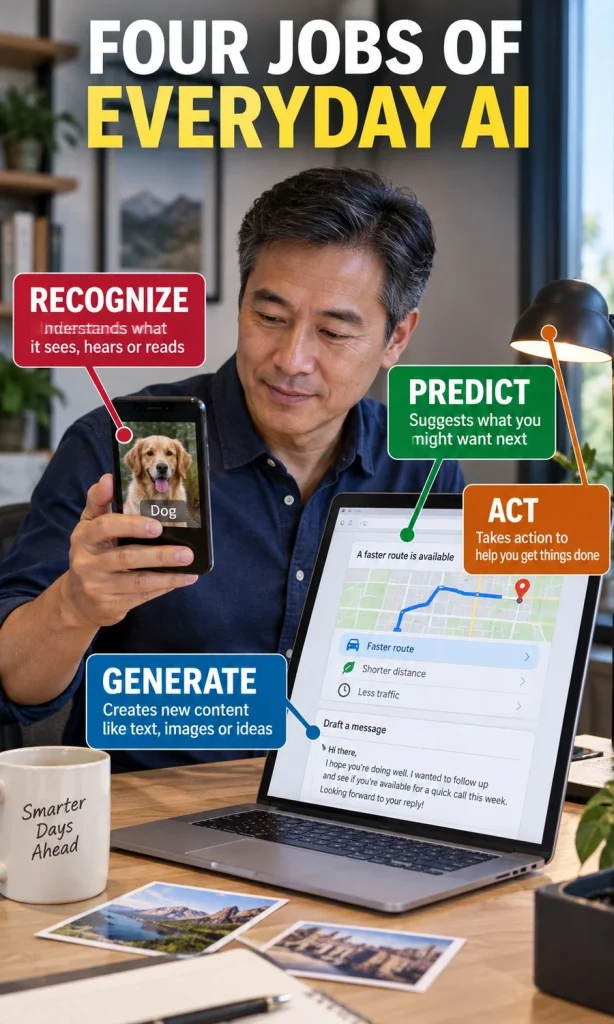
| AI job | Everyday example | Main question to ask |
|---|---|---|
| Recognize or classify | Spam detection, photo search, speech recognition | What happens when it classifies something incorrectly? |
| Predict or recommend | Routes, product suggestions, media recommendations | What objective is the system optimizing for? |
| Generate | Text, images, summaries, code, translations | How will I verify the output before using it? |
| Act or automate | Smart-home routines, workflow actions, agentic systems | What can it change, spend, send, delete, or approve? |
The last category deserves the most attention because action creates consequences. A system that merely suggests a draft can be reviewed before anything happens, while a system allowed to send, purchase, schedule, approve, or modify records may create an effect before a person looks at the result. If you are exploring this newer layer, what is agentic AI explains how action-oriented systems differ from ordinary generation.
What Data Can Everyday AI Use?
AI cannot produce a personalized result without some kind of input, and the input may be more revealing than the output. Depending on the service, signals can include your text, voice, images, purchase history, clicks, contacts, location, sensor data, device information, account history, or patterns inferred from earlier behavior. A useful privacy review therefore starts by asking what data is collected, not just whether the company says it uses AI responsibly.
It is also worth separating temporary processing from long-term storage. A feature may need to process a photo to perform a task without necessarily retaining it indefinitely, while another service may store interactions to provide history, improve personalization, or train future systems under its stated terms. Read the product’s current privacy controls for the feature you are actually using, because broad assumptions about “on-device AI” or “cloud AI” can be wrong when products mix both.
When Should You Trust AI, and When Should You Verify It?
Trust should depend on the consequence of an error, not on how polished the interface looks. A recommendation for a song and a recommendation that changes a medical, financial, legal, security, or driving decision should not be treated as the same kind of output. The higher the stakes, the more important it becomes to verify the source, inspect the underlying evidence, and keep a human decision-maker in the loop.

| Situation | Reasonable use | Human check |
|---|---|---|
| Low-stakes convenience | Recommendations, drafting, sorting, routine suggestions | Check only what matters before acting |
| Money or account access | Fraud alerts, categorization, document assistance | Verify amounts, recipients, identity, and source |
| Health, safety, legal rights | Decision support within an appropriate workflow | Use qualified human oversight and authoritative evidence |
| Identity or urgent request | Detection and screening assistance | Confirm through a known independent channel |
Voice cloning is a good example of why polished output cannot be treated as proof of identity. A caller may sound familiar while the audio itself has been generated or manipulated, so the safest response to an urgent money or account request is to verify the person through a number or channel you already trust. The same principle applies to convincing images, videos, documents, and messages: realism is not evidence of authenticity.
Why Everyday AI Gets Things Wrong
AI errors come from several different failure modes, and the remedy depends on the type of system. A model can receive poor input, learn from unrepresentative data, optimize for a goal that does not match yours, misclassify an unusual case, produce a confident generative error, or act on outdated information. That is why a single “accuracy” claim rarely tells you everything you need to know about how a system will behave in your specific situation.
Generative AI creates an additional problem because fluent language can hide uncertainty. A response may be grammatically excellent while a date, quotation, calculation, source, or technical detail is wrong, and the model may not reliably signal which part deserves doubt. For decisions where the cost of error is meaningful, compare the AI output with primary sources or a responsible human expert rather than asking the model to reassure you about its own answer.
A Four-Question Check Before You Let AI Influence a Decision
You do not need to understand every model architecture to use AI more safely. Four practical questions reveal most of the risk: what is the system doing, what data is it using, what happens if it is wrong, and can a person review or reverse the result. If you cannot answer those questions, that uncertainty should reduce how much authority you give the system.
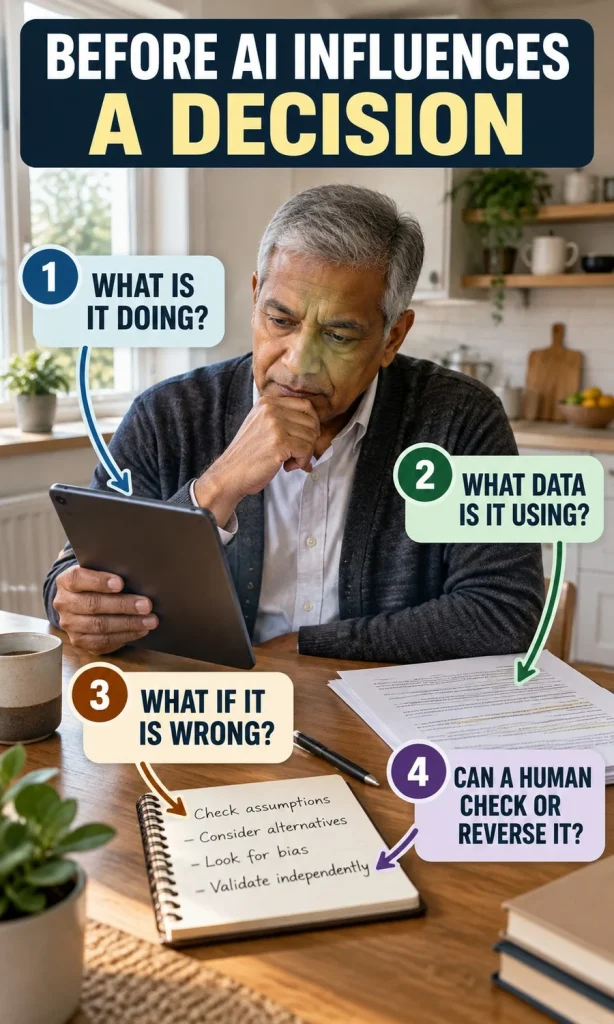
- What is the AI actually doing? Is it recognizing, predicting, generating, recommending, or taking action?
- What information is it using? Does the feature rely on public data, your private data, sensors, location, account history, or something you cannot inspect?
- What is the consequence of a mistake? Would the error be merely inconvenient, financially costly, unsafe, discriminatory, or difficult to reverse?
- Where is the human checkpoint? Can you review the output before anything is sent, purchased, approved, deleted, diagnosed, or changed?
This approach is more useful than trying to decide whether AI as a whole is trustworthy. Different systems deserve different levels of reliance, and the same system may be acceptable for one task but inappropriate for another. The decision guide on whether you should use AI and the broader AI safety and ethics guide can help when the trade-offs are less obvious.
What Changes as AI Moves From Assistant to Agent?
The next major change is not simply that AI will write better answers. More systems are being designed to connect to calendars, documents, software, payments, customer records, devices, or other services and then perform multi-step actions on a user’s behalf. That makes permission design, audit history, confirmation steps, spending limits, and reversible actions increasingly important.
A useful assistant can propose a route, draft a message, or organize options without making the final commitment. An action-oriented system can go further by sending, scheduling, editing, purchasing, or triggering workflows, which moves risk from “wrong answer” toward “wrong action.” The safest systems therefore make their scope visible and give users a clear way to review or stop consequential steps.
Artificial Intelligence Close to Us Is Mostly About Better Decisions
Everyday AI is already embedded in devices and services that many people use without thinking of them as artificial intelligence. Its most useful roles are often modest: recognizing a pattern faster, reducing repetitive work, finding a likely option, making information easier to access, or helping a person produce a first draft. Those benefits are real, but they do not remove the need to understand the system’s purpose and the cost of an error.
The strongest habit is simple: let AI handle pattern-heavy assistance while keeping human judgment attached to consequences. Use it freely where mistakes are cheap and reversible, verify it where money or identity is involved, and demand appropriate professional or human oversight where health, safety, rights, or major decisions are at stake. For a broader comparison of strengths and limits, continue with AI vs human decision-making and real-world AI use cases.
Frequently Asked Questions
What is the most common AI people use every day?
There is no single feature used by everyone, but recommendation, ranking, spam filtering, navigation, photo processing, speech recognition, and generative assistants are common forms of everyday AI. Many of them operate in the background and may not be labeled prominently as AI. The easiest way to identify them is to look for software that recognizes, predicts, recommends, generates, or automatically adjusts an output from data.
Is every automated feature artificial intelligence?
No. Traditional automation can follow fixed rules without learning, prediction, or model-based inference, while AI systems generally infer an output from inputs. A timer, a basic “if this, then that” rule, or a fixed spreadsheet formula can automate work without being AI. The boundary can become less obvious when a product combines ordinary software, automation, and AI in the same workflow.
Does AI on my phone always send my data to the cloud?
No. Some AI features can run entirely or partly on the device, while others rely on remote servers, and some products use a mixture of both approaches. The exact behavior depends on the feature, operating system, settings, and service design. Check the current privacy and permission information for the specific function rather than assuming all phone AI works the same way.
Can I trust AI recommendations?
A recommendation can be useful without being objectively best. The system is usually optimizing for a defined goal such as predicted relevance, engagement, convenience, or another measurable outcome. For important purchases or decisions, treat the recommendation as one input and compare alternatives outside the system’s ranked list.
What should I never give an AI system without checking the rules?
Be cautious with passwords, authentication codes, confidential business information, protected personal data, financial account details, private medical records, and information you are not authorized to share. Some products are designed for sensitive data under specific agreements, while general consumer services may not be. The correct question is whether that particular service is approved and appropriate for the information you plan to provide.
Will everyday AI eventually make decisions for us automatically?
Some systems already automate bounded decisions or actions, and action-oriented AI is expanding into more software workflows. That does not mean every decision should be delegated, because the acceptable level of autonomy depends on permissions, stakes, oversight, and how easily an error can be reversed. As AI becomes more capable of acting, the quality of confirmation steps and human controls becomes more important rather than less.
Sources and Evidence
This article uses the OECD’s updated explanation of an AI system, NIST’s AI Risk Management Framework, FDA information on AI-enabled medical devices, FTC guidance on AI-enabled voice cloning, and NHTSA material distinguishing driver-assistance features from self-driving. These sources support the article’s core distinctions between inference, risk, regulated medical applications, identity verification, and driver responsibility. Product behavior can change over time, so readers should also check the current documentation and privacy settings for the specific services they use.