

Most workflow automation failures are not caused by bad automation software.
They happen because organizations automate activities before understanding how information, decisions, ownership, approvals, and execution move throughout the workflow.
At first, automation often appears successful. Notifications arrive faster. Tasks move automatically. Reports are generated instantly. Information is transferred between systems without human intervention.
These visible improvements create the impression that productivity has increased.
However, long-term productivity depends less on speed and more on whether the workflow remains understandable, visible, retrievable, and manageable after months of continuous use.
Many automation projects quietly create new operational problems while appearing efficient on the surface.
An automation system that reduces visibility, increases retrieval difficulty, or disconnects decisions from execution can become less productive than a partially manual workflow.
AI Workflow Automation Architect™
Find your hidden workflow bottlenecks, automation risks, AI readiness score and practical 90-day automation roadmap.
1. Tell Us About Your Work
2. Select Your Biggest Time Wasters
Choose at least one workflow problem.
3. Select Your Current AI and Automation Tools
You may select more than one tool.
This is why understanding an AI workflow automation system requires looking beyond automation itself and examining how work moves through an organization.
A successful AI productivity system often depends on reliable workflow automation that preserves visibility and operational continuity.
What Is an AI Workflow Automation System

An AI workflow automation system is a structured operational framework that uses automation and artificial intelligence to move information, decisions, approvals, and tasks through a workflow with less manual intervention.
Many people associate automation with repetitive tasks.
While repetitive work is often automated, workflow automation affects a much broader operational environment.
A workflow automation system can influence:
- information movement
- approval processes
- communication flow
- task assignment
- prioritization
- operational visibility
- decision support
The goal is not simply reducing manual work.
The goal is reducing operational friction while preserving continuity across the workflow.
Automation and Workflow Are Not the Same Thing
Many organizations mistakenly treat automation and workflow as interchangeable concepts.
They are not.
Automation refers to individual actions that occur automatically.
A workflow refers to the sequence of actions required to move work from initiation to completion.
For example, an email notification can be automated.
However, if nobody knows who owns the next step, the workflow remains broken.
A report can be generated automatically.
However, if decision-makers cannot find or use the report, workflow performance does not improve.
Automation improves activities.
Workflow improvement requires the entire operational sequence to function more effectively.
What Workflow Automation Actually Automates
Workflow automation often extends far beyond simple task execution.
Organizations frequently automate:
- approvals
- document routing
- notifications
- data transfers
- record updates
- report generation
- information classification
- task creation
As automation expands, the amount of operational information also expands.
This creates new challenges involving retrieval, governance, visibility, and accountability.
Why Organizations Invest in Workflow Automation
Organizations rarely automate because employees are incapable of completing work manually.
Most automation initiatives begin because operational complexity grows faster than human coordination capacity.
As teams expand, workflows become larger and more interconnected.
Information moves through more systems.
Decisions involve more stakeholders.
Projects require more coordination.
Automation attempts to reduce the friction created by this complexity.
Reducing Repetitive Administrative Work
Many operational activities generate little strategic value.
Examples include:
- copying information
- updating records
- sending routine notifications
- assigning tasks
- distributing reports
These activities consume time without directly contributing to business outcomes.
Automation reduces the need for constant manual repetition.
Improving Operational Consistency
Human processes naturally vary.
Different people often complete the same task differently.
Automation creates consistency by applying the same workflow rules repeatedly.
This often improves reliability and reduces avoidable variation.
Supporting Larger Volumes of Work
As organizations grow, manual coordination becomes increasingly difficult.
Automation allows workflows to scale without requiring proportional increases in administrative effort.
This scalability is one reason workflow automation remains attractive for growing organizations.
The Difference Between Task Automation and Workflow Automation
Many discussions about automation focus on individual tasks.
However, task automation and workflow automation solve different problems.
Task automation improves a specific activity.
Workflow automation improves how activities connect together.
| Task Automation | Workflow Automation |
|---|---|
| Automates a specific activity. | Automates connected operational processes. |
| Focuses on local efficiency. | Focuses on system-wide performance. |
| Improves individual actions. | Improves information and task flow. |
| Often operates independently. | Connects multiple workflow stages. |
| Produces limited visibility. | Produces broader operational visibility. |
| Usually delivers immediate efficiency gains. | Often delivers long-term productivity gains. |
Task automation often delivers immediate efficiency gains.
Workflow automation focuses on improving the entire operational system.
Organizations frequently automate tasks successfully while still struggling with workflow performance because the underlying process remains fragmented.
How AI Changes Workflow Automation

Traditional automation systems rely primarily on predefined rules.
AI introduces adaptability.
Instead of following only fixed instructions, AI systems can assist with classification, routing, retrieval, prioritization, and decision support.
This changes how workflows operate.
Automation becomes capable of responding to context rather than relying exclusively on rigid rules.
Automation is most effective when integrated with an AI workplace communication system that preserves context across teams.
AI Improves Classification
Organizations process large volumes of information every day.
Documents, messages, requests, approvals, and reports continuously enter operational systems.
AI can assist by categorizing information based on context.
This often reduces manual sorting effort.
AI Improves Routing
Routing determines where information should move next.
Traditional systems typically rely on predefined pathways.
AI can evaluate context and support more intelligent routing decisions.
This often improves workflow efficiency.
AI Improves Retrieval
Many productivity problems are retrieval problems.
Workers frequently spend more time searching than creating.
AI can improve retrieval by helping users locate relevant information faster.
This reduces operational friction and supports workflow continuity.
AI Improves Decision Support
Decision-making often depends on information gathering.
AI can summarize information, identify patterns, and surface relevant context.
While humans remain responsible for decisions, AI can reduce the effort required to gather supporting information.
Why Workflow Automation Projects Fail
Automation failures are often described as software failures.
In reality, most workflow automation failures originate from workflow design problems rather than technology problems.
Organizations frequently automate processes before fully understanding how work moves through the organization.
As a result, automation distributes existing weaknesses more efficiently.
The workflow becomes faster, but it does not become healthier.
Many organizations eventually discover that automation has accelerated confusion rather than reducing it.
Automating Broken Processes
One of the most common automation mistakes is assuming automation can repair a broken process.
A broken process remains broken after automation.
The difference is that the problems now occur more consistently.
For example, if approvals frequently move to the wrong people, automation may simply route approvals incorrectly at a faster rate.
If important information is missing before a decision is made, automation may increase the speed of poor decisions.
Automation improves execution speed.
It does not automatically improve process quality.
Organizations often achieve better results by fixing workflow design before implementing automation.
Missing Ownership
Automation cannot replace accountability.
Many workflow failures occur because nobody clearly owns the process.
Tasks move automatically.
Notifications are generated automatically.
Reports appear automatically.
However, when exceptions occur, nobody knows who is responsible for resolving them.
Ownership remains one of the most important requirements for sustainable workflow automation.
Without ownership:
- issues remain unresolved
- approvals become delayed
- accountability disappears
- decision-making slows
Technology cannot solve responsibility problems.
Only workflow governance can solve them.
Hidden Workflow Dependencies
Many workflows depend on information that exists outside the automation system.
These dependencies are often invisible during implementation.
Examples include:
- verbal approvals
- undocumented procedures
- external spreadsheets
- private communication channels
- informal decision-making
Automation systems frequently assume information is contained within the workflow.
When hidden dependencies exist, the automation process becomes unreliable.
This often explains why automation performs well during testing but struggles during real-world operation.
Weak Exception Handling
Most workflow automation systems are designed around normal conditions.
Real organizations rarely operate under normal conditions all the time.
Unexpected situations occur regularly.
Examples include:
- missing information
- conflicting approvals
- unavailable personnel
- incomplete requests
- system failures
A healthy automation system includes clear exception-handling procedures.
A failing automation system assumes exceptions will not occur.
Over time, unresolved exceptions create workflow bottlenecks that reduce the value of automation.
The same problems frequently appear inside an AI task management workflow when ownership, escalation paths, and retrieval systems are poorly defined.
Automation Does Not Remove Human Responsibility
A common misconception is that automation eliminates the need for human oversight.
In reality, oversight becomes more important as automation expands.
Automated workflows influence operational decisions, task routing, approvals, communications, and information movement.
The greater the influence of automation, the greater the potential impact of errors.
Humans remain responsible for:
- governance
- monitoring
- exception management
- quality control
- policy enforcement
- escalation decisions
Automation changes how work is executed.
It does not remove accountability.
Organizations that assume automation can operate independently often experience declining visibility over time.
Eventually, teams lose confidence in the workflow because they no longer understand how decisions are being made.
Healthy vs Failing AI Workflow Automation Systems

Most workflow automation systems initially appear successful.
The differences become visible only after extended use.
Healthy systems preserve visibility, retrieval, ownership, and operational continuity.
Failing systems gradually accumulate hidden complexity.
| Healthy Automation System | Failing Automation System |
|---|---|
| Ownership remains clear. | Ownership becomes unclear. |
| Workflow paths remain visible. | Workflow behavior becomes difficult to trace. |
| Automation performance is monitored. | Failures remain hidden. |
| Exceptions are managed effectively. | Exceptions accumulate over time. |
| Information remains retrievable. | Information becomes difficult to locate. |
| Human oversight remains active. | Blind trust replaces oversight. |
| Automation reduces operational friction. | Automation creates additional complexity. |
| Workflow continuity improves. | Workflow continuity deteriorates. |
The most important difference is not automation volume.
The most important difference is operational clarity.
A healthy automation system makes work easier to understand.
A failing automation system makes work harder to understand.
Workflow Automation and Retrieval Debt
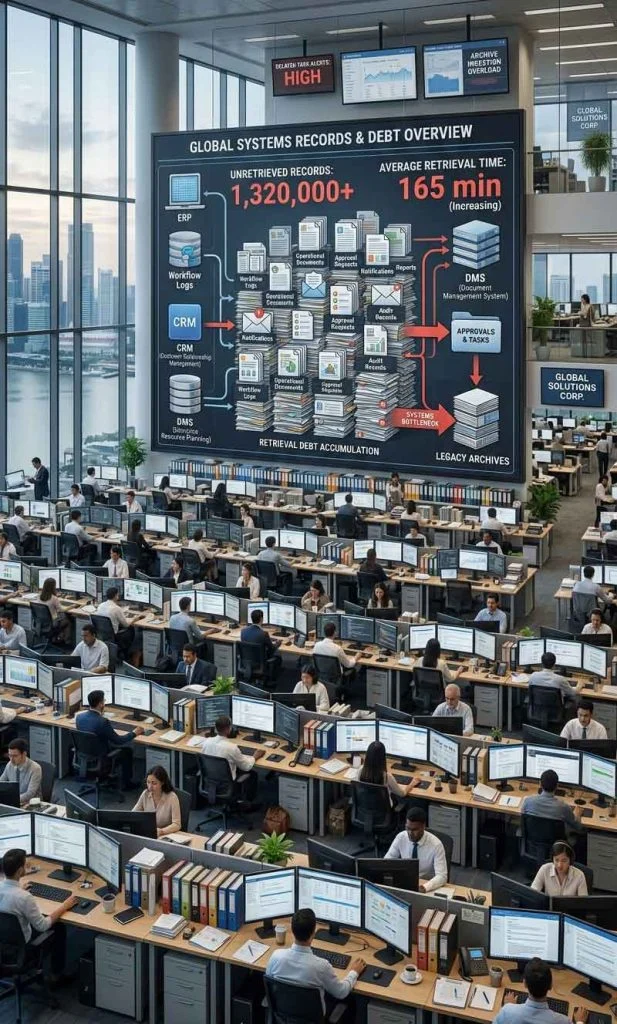
Automation continuously generates information.
Every notification, approval, report, workflow event, task update, and decision record contributes to growing information volume.
Many organizations assume that storing information automatically solves knowledge problems.
Unfortunately, storage and retrieval are not the same thing.
Information that cannot be found efficiently has limited operational value.
This creates retrieval debt.
Retrieval debt occurs when information grows faster than the organization’s ability to locate, understand, and reuse it.
Many automation failures originate from the same retrieval problems that affect AI knowledge management systems.
Initially, the workflow appears successful.
Over time:
- searches take longer
- context becomes fragmented
- decisions become difficult to trace
- duplication increases
- operational friction grows
Automation often increases information volume.
Without retrieval architecture, it can also increase retrieval difficulty.
This is one reason automation should remain connected to broader knowledge management and productivity systems.
Why Small Automation Improvements Compound Over Time
Large automation projects often receive the most attention.
However, many productivity gains originate from smaller improvements.
A workflow that saves only a few minutes per task can create substantial operational benefits when repeated thousands of times.
Small improvements often follow a compounding pattern.
Reduction in friction
↓
Improved workflow continuity
↓
Higher completion rates
↓
Lower operational waste
↓
Better productivity outcomes
The cumulative effect becomes visible over months rather than days.
Organizations that focus only on dramatic automation projects often overlook these smaller opportunities.
In many cases, sustainable productivity growth results from consistent reductions in operational friction rather than large automation initiatives.
Signs Your Automation System Is Working
Many organizations evaluate automation success by counting automations.
This measurement can be misleading.
A large number of automations does not guarantee improved productivity.
More useful measurements focus on workflow outcomes.
Healthy systems typically produce:
- lower friction
- better visibility
- faster retrieval
- stronger continuity
- reduced manual effort
Failing systems often produce:
- more troubleshooting
- increased complexity
- reduced visibility
- fragmented information
- operational confusion
| Healthy Signal | Warning Signal |
|---|---|
| Less manual work is required. | Manual intervention continues increasing. |
| Execution becomes faster. | Execution delays remain common. |
| Information is easy to retrieve. | Workers spend excessive time searching. |
| Workflow visibility remains high. | Workflow status becomes unclear. |
| Ownership is understood. | Responsibility becomes ambiguous. |
| Automation reduces friction. | Automation increases complexity. |
| Operational continuity improves. | Teams repeatedly reconstruct context. |
| Automation supports decision-making. | Automation creates decision confusion. |
The goal is not maximizing automation.
The goal is improving workflow performance while preserving operational clarity.
Workflow Automation Creates New Operational Risks
Most discussions about automation focus on benefits.
Organizations often expect automation to reduce workload, improve efficiency, and accelerate execution. While these outcomes are possible, automation can also introduce new operational risks.
Many workflow failures do not originate from the automation technology itself.
They originate from the way automation changes how work is performed.
As automation expands, organizations become increasingly dependent on systems that may be difficult to understand, monitor, or modify.
When failures occur, recovery may become more complicated than in manual workflows.
Common automation risks include:
- hidden failures
- unclear ownership
- workflow dependencies
- governance gaps
- monitoring weaknesses
- retrieval problems
The challenge is not avoiding automation.
The challenge is understanding how automation changes operational behavior.
Hidden Failures Scale Faster Than Visible Failures
A manual mistake is often noticed immediately.
An automated mistake can repeat hundreds or thousands of times before detection.
For example, an incorrectly configured workflow may route requests to the wrong department for weeks before somebody notices.
Because automation increases execution speed, failures can also spread faster.
This is one reason monitoring and governance remain essential components of healthy workflow automation systems.
Automation Changes Information Flow
Workflow automation affects more than tasks.
It also changes how information moves through an organization.
Before automation, information often moves through people.
Employees forward emails, update spreadsheets, attend meetings, and communicate status changes manually.
After automation, information increasingly moves through systems.
This shift creates significant efficiency gains.
However, it also changes how visibility, retrieval, and accountability operate.
Organizations that fail to adapt often experience new forms of operational friction.
Faster Information Is Not Always Better Information
Information delivered faster is not automatically more useful.
Decision quality still depends on:
- relevance
- context
- timing
- accuracy
Organizations sometimes become obsessed with speed while neglecting information quality.
A workflow that distributes poor information quickly may perform worse than a slower workflow that preserves context and accuracy.
Workflow Automation and Organizational Complexity
As organizations grow, operational complexity increases.
New departments, tools, vendors, projects, and approval layers create additional coordination requirements.
Automation is often introduced as a solution to complexity.
However, automation does not automatically eliminate complexity.
In many cases, it simply relocates complexity into systems, rules, and workflow configurations.
Organizations that understand this transition usually manage automation more effectively.
Complexity Does Not Disappear
Complexity rarely disappears.
It changes form.
Instead of existing inside manual work, complexity begins to exist inside:
- workflow logic
- automation rules
- integrations
- dependencies
- approval structures
The goal of workflow automation is not eliminating complexity.
The goal is making complexity more manageable.
Organizations that recognize this distinction often avoid unrealistic automation expectations.
AI Workflow Automation and Decision Velocity
Many productivity problems are actually decision problems.
Work slows when decisions slow.
Approvals wait.
Tasks wait.
Projects wait.
Information waits.
Execution becomes delayed because the organization cannot move decisions forward efficiently.
Workflow automation often improves decision velocity by reducing delays between information and action.
When information reaches decision-makers faster, organizations can respond more quickly.
This is one reason automation frequently produces operational benefits even when direct labor savings remain modest.
Faster Decisions vs Better Decisions
Decision speed and decision quality are not identical.
Organizations should avoid measuring automation success solely through speed improvements.
Healthy workflow automation balances:
- speed
- visibility
- accountability
- quality
The goal is not making decisions as quickly as possible.
The goal is enabling better decisions with less friction.
Measuring Workflow Automation Success
Many automation projects fail because success is poorly defined.
Organizations frequently measure:
- number of automations
- number of workflows
- number of integrations
- number of automated tasks
While these metrics may indicate activity, they do not necessarily indicate productivity.
More useful measurements focus on outcomes.
Examples include:
- workflow completion rates
- retrieval efficiency
- cycle time reduction
- exception resolution speed
- operational visibility
- ownership clarity
Successful organizations evaluate whether automation improves operational performance rather than simply increasing automation volume.
Productivity Metrics and Automation Metrics Are Different
An automation metric measures activity.
A productivity metric measures outcomes.
This distinction is important.
An organization may deploy dozens of new automations while seeing little improvement in execution quality.
The most valuable automation systems improve outcomes rather than merely increasing activity.
Why Some Organizations Remove Automation
Many people assume automation always moves in one direction.
In reality, organizations occasionally remove automations.
This is not necessarily a failure.
Sometimes automation creates more complexity than value.
Examples include:
- excessive maintenance requirements
- governance difficulties
- poor visibility
- unreliable outputs
- workflow confusion
Removing an ineffective automation may improve workflow performance.
The objective is not maximizing automation.
The objective is maximizing operational effectiveness.
Healthy organizations regularly evaluate whether existing automations continue delivering value.
Workflow Automation and Future AI Systems
Future workflow automation systems will likely become more adaptive.
AI technologies continue improving classification, retrieval, routing, prediction, and decision support capabilities.
However, the fundamental operational requirements are unlikely to change.
Organizations will still require:
- ownership
- governance
- accountability
- monitoring
- retrieval
- visibility
Technology evolves.
Operational fundamentals remain remarkably stable.
The organizations most likely to benefit from future AI workflow automation systems will be those that already understand how information, decisions, and execution interact inside complex workflows.
Workflow Automation Changes Workplace Behavior
Automation does more than change processes.
It also changes how people behave.
When repetitive activities disappear, workers often spend more time on decision-making, coordination, problem-solving, and exception handling.
This shift can improve productivity.
However, it can also create new challenges.
Organizations sometimes discover that employees become dependent on automation and gradually lose visibility into how work actually moves through the workflow.
The result is a growing gap between operational execution and operational understanding.
Healthy workflow automation encourages workers to understand the system while benefiting from automation.
Failing workflow automation encourages passive dependence on automated processes.
Automation Should Support Awareness, Not Replace It
A common mistake is assuming automation should remove human involvement entirely.
In reality, workers often perform better when automation reduces friction while preserving awareness.
People should still understand:
- workflow status
- ownership
- escalation paths
- exception handling
- operational priorities
Automation works best when it supports awareness rather than replacing it.
Evaluating Workflow Automation Maturity
Not all workflow automation systems operate at the same level of maturity.
Some organizations automate individual tasks.
Others automate entire operational ecosystems.
Understanding maturity helps organizations evaluate where improvements are needed.
Workflow Automation Maturity Levels
| Maturity Level | Characteristics |
|---|---|
| Manual | Processes rely primarily on human execution. |
| Basic Automation | Individual tasks become automated. |
| Workflow Automation | Multiple workflow stages become connected. |
| AI-Assisted Automation | Classification, routing, retrieval, and prioritization improve through AI support. |
| Mature Automation Ecosystem | Governance, monitoring, retrieval, orchestration, and operational continuity work together. |
Organizations often move gradually through these stages.
A mature automation environment typically includes:
- governance
- monitoring
- retrieval systems
- ownership structures
- orchestration capabilities
Automation maturity is usually a progression rather than a destination.
When Workflow Automation Should Not Be Used
Automation is valuable, but not every process should be automated.
Some activities require:
- human judgment
- creativity
- negotiation
- relationship management
- ethical decision-making
Automating these activities too aggressively can reduce effectiveness.
Organizations should evaluate whether automation improves outcomes rather than simply reducing human involvement.
In some situations, a partially automated workflow performs better than a fully automated workflow.
The objective is not eliminating human participation.
The objective is improving operational performance.
Automation Is a Tool, Not a Strategy
A workflow automation system supports strategy.
It does not replace strategy.
Organizations that treat automation as a universal solution often become disappointed.
Organizations that use automation selectively tend to achieve more sustainable results.
Workflow Automation and Workflow Completion
Many organizations evaluate automation based on activity.
They measure:
- tasks created
- notifications sent
- workflows triggered
- approvals processed
While these measurements may be useful, they do not necessarily indicate successful outcomes.
A workflow only creates value when it reaches completion.
Completion means work successfully moves from initiation to outcome.
An automated workflow that generates activity without producing completed outcomes provides limited operational value.
This distinction is important because organizations sometimes become focused on workflow movement rather than workflow completion.
A task may move automatically through multiple stages while still failing to produce meaningful results.
Healthy workflow automation supports completion.
Failing workflow automation often increases activity while reducing clarity.
Activity Does Not Always Equal Progress
Automation often increases visible activity.
Workers receive notifications.
Systems generate updates.
Dashboards display movement.
These signals can create the impression that productivity is improving.
However, activity and progress are not identical.
Organizations should evaluate whether automation contributes to:
- completed work
- successful outcomes
- operational continuity
- reduced friction
- measurable business value
When automation produces activity without completion, productivity improvements often fail to materialize.
Why Workflow Visibility Matters More Than Workflow Speed
Speed is one of the most common automation objectives.
Organizations often attempt to reduce delays, shorten approval cycles, and accelerate execution.
While speed can be beneficial, visibility is often more important.
A fast workflow that nobody understands can create significant operational risk.
Workers need visibility into:
- workflow status
- ownership
- decision history
- approval paths
- exception handling
Without visibility, troubleshooting becomes difficult.
Organizations may struggle to understand why outcomes are changing or where failures originate.
Visibility helps transform automation into a manageable operational system.
Visibility Supports Trust
Trust is an important but often overlooked automation requirement.
People are more likely to trust workflows when they understand how the system operates.
Visible workflows support:
- accountability
- governance
- transparency
- confidence
Invisible workflows often create uncertainty.
Over time, uncertainty reduces trust in automation systems.
Operational State Is More Important Than Automation Volume
Organizations sometimes compare automation maturity by counting:
- automations
- workflows
- integrations
- AI tools
These measurements rarely explain operational performance.
A company with twenty well-managed automations may outperform a company with two hundred poorly managed automations.
The more useful question is:
How healthy is the operational state created by automation?
Healthy operational states typically include:
- clear ownership
- strong retrieval
- workflow visibility
- manageable complexity
- effective governance
- reliable monitoring
These factors often influence productivity more than automation quantity.
Automation Should Strengthen Operational Stability
A successful workflow automation system improves stability.
Workers spend less time searching.
Tasks move more predictably.
Decisions become easier to trace.
Exceptions become easier to resolve.
Automation should strengthen operational stability rather than increase operational volatility.
How Workflow Automation Reduces Information Retrieval Friction

Workflow automation becomes more useful when it helps people retrieve information faster.
Many workflow delays happen because workers cannot quickly find approvals, decisions, documents, task history, or previous context.
Automation should reduce this friction by keeping workflow information connected and traceable.
A strong AI workflow automation system helps workers locate:
- past approvals
- task ownership
- decision history
- workflow status
- supporting documents
- previous communication context
This matters because productivity does not improve only when tasks move faster.
It improves when workers can continue work without repeatedly reconstructing context.
When Human Intervention Is Still Necessary
AI workflow automation can reduce repetitive work, but it should not remove human judgment from important decisions.
Some workflow situations still require human intervention.
These include exceptions, unusual requests, ethical decisions, customer complaints, conflicting approvals, and cases where incomplete information may affect the outcome.
Human review remains important because automation systems operate based on available inputs and workflow rules.
When those inputs are unclear, incomplete, or unusual, human judgment helps prevent avoidable mistakes.
Automation Should Support Judgment, Not Replace It
The strongest workflow automation systems support human judgment instead of replacing it completely.
They reduce manual effort while keeping responsibility, escalation, and accountability visible.
How AI Agents Extend Traditional Workflow Automation

AI agents extend workflow automation by helping systems perform more context-aware actions.
Traditional automation usually follows fixed rules.
AI agents can assist with task execution, information retrieval, workflow monitoring, decision support, and exception detection.
This does not mean AI agents should operate without oversight.
Instead, they should function as support layers inside a governed workflow system.
AI Agents Still Need Workflow Boundaries
AI agents become more useful when they operate inside clear boundaries.
These boundaries include ownership, permissions, escalation rules, monitoring, and human review points.
Common Workflow Automation Use Cases
Workflow automation can appear in many parts of an organization.
Workflow Types Comparison
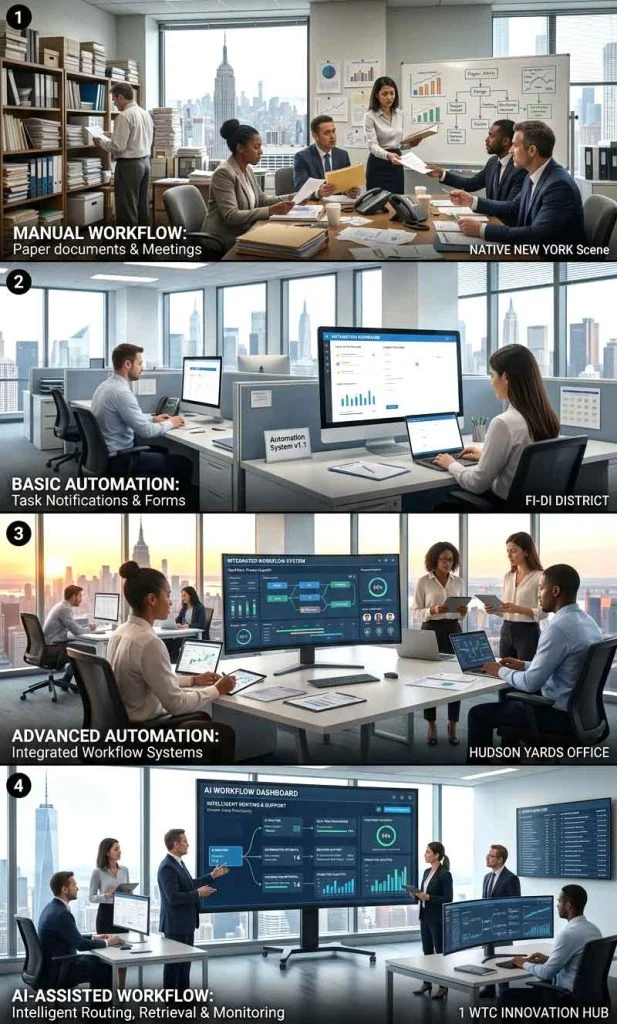
| Workflow Type | Human Effort | Flexibility | Complexity |
|---|---|---|---|
| Manual Workflow | High | High | Low |
| Basic Automation | Medium | Medium | Medium |
| Advanced Automation | Low | Medium | High |
| AI-Assisted Workflow | Low | High | High |
The exact use case depends on how information, approvals, tasks, and decisions move through the business.
HR Workflow Automation
HR teams may use automation for onboarding, document collection, leave approvals, employee records, and internal requests.
Finance Workflow Automation
Finance teams may use automation for invoice routing, approval workflows, payment reminders, budget reviews, and recurring reports.
Marketing Workflow Automation
Marketing teams may use automation for campaign approvals, content calendars, lead routing, reporting, and performance tracking.
Customer Support Workflow Automation
Support teams may use automation for ticket routing, escalation, response suggestions, follow-up reminders, and case summaries.
Project Management Workflow Automation
Project teams may use automation for task assignment, status updates, deadline reminders, dependency tracking, and progress reporting.
Query Paths Users Often Explore After Workflow Automation
People researching workflow automation often continue exploring related topics.
Common next-step questions include:
- What is an AI productivity system?
- How does workflow automation affect task management?
- What causes workflow automation failures?
- How should automation be monitored?
- How can workflow visibility be improved?
- What is automation governance?
- How does workflow automation affect communication systems?
- How does retrieval influence automation performance?
These related topics help explain how workflow automation fits into broader operational systems.
Workflow Automation Requires Governance
Many organizations focus heavily on automation implementation while spending little time on governance.
Governance determines how automation should operate, who can modify workflows, who approves changes, and how exceptions are handled.
Without governance, automation systems often become difficult to manage.
A workflow may continue operating even when it no longer aligns with organizational objectives.
Governance typically includes:
- ownership assignment
- approval policies
- workflow standards
- change management
- audit procedures
The larger the automation system becomes, the more important governance becomes.
Why Governance Becomes More Important Over Time
Small automation systems often operate successfully with informal management.
As complexity grows, informal management becomes increasingly risky.
Organizations eventually need structured oversight to maintain consistency and accountability.
Workflow Monitoring Is Often More Important Than Automation
Automation can fail silently.
Tasks may stop moving.
Notifications may stop arriving.
Approvals may become trapped inside workflow bottlenecks.
Without monitoring, these failures often remain invisible until productivity declines.
A healthy automation system continuously measures:
- workflow completion rates
- exception rates
- processing delays
- ownership gaps
- workflow bottlenecks
Monitoring transforms automation from a static system into a manageable operational process.
Healthy Monitoring vs Reactive Monitoring
Organizations that monitor proactively often discover problems before productivity is affected.
Organizations that monitor reactively usually discover problems only after operational performance has already declined.
Workflow Orchestration Connects Separate Automations
Many businesses eventually create dozens or hundreds of automations.
The challenge is no longer automation.
The challenge becomes orchestration.
Workflow orchestration coordinates multiple automations so they function as a connected operational system.
Without orchestration:
- automations become isolated
- information becomes fragmented
- visibility decreases
- duplication increases
Orchestration helps preserve continuity between workflow stages.
Automation Volume Does Not Equal Workflow Quality
Adding more automations does not automatically improve productivity.
In some environments, excessive automation increases operational complexity.
The goal is coordination rather than automation quantity.
Limitations of AI Workflow Automation Systems
Workflow automation provides significant operational benefits.
However, it also has limitations.
Automation cannot:
- replace leadership
- replace accountability
- replace organizational judgment
- eliminate uncertainty
- remove every exception
Organizations that expect automation to solve all operational problems often become disappointed.
Automation performs best when supporting well-designed workflows rather than replacing them.
Human Judgment Remains Essential
AI can assist with classification, retrieval, routing, and recommendations.
Final responsibility still belongs to humans.
This remains true regardless of how advanced the automation system becomes.
Workflow Automation Creates New Operational Risks
Most automation discussions focus on benefits.
However, automation can also introduce new risks.
As workflow complexity grows, organizations may become dependent on systems that are difficult to understand.
When failures occur, recovery becomes more difficult.
Automation risks often include:
- hidden failures
- ownership confusion
- dependency chains
- monitoring gaps
- governance weaknesses
Hidden Failures Scale Faster Than Visible Failures
A manual mistake is usually visible.
An automated mistake may repeat hundreds of times before detection.
This is one reason monitoring remains critical.
Automation Changes Information Flow
Workflow automation does more than move tasks.
It changes how information travels through an organization.
Before automation:
Information often moves through people.
After automation:
Information increasingly moves through systems.
This shift creates advantages and challenges.
Faster Information Is Not Always Better Information
Information delivered faster is not automatically more useful.
Quality, context, and timing remain important.
Organizations often discover that speed alone does not improve decisions.
Workflow Automation and Organizational Complexity
As organizations grow, complexity grows.
New teams, departments, tools, vendors, and approval layers increase coordination requirements.
Automation is often introduced to manage complexity.
Ironically, poor automation can create additional complexity.
Complexity Does Not Disappear
Automation rarely removes complexity.
More often, it relocates complexity into systems, rules, workflows, and dependencies.
Organizations that understand this transition usually manage automation more successfully.
AI Workflow Automation and Decision Velocity
Decision velocity refers to how quickly organizations can make and execute decisions.
Many productivity bottlenecks are actually decision bottlenecks.
Approvals wait.
Information waits.
Tasks wait.
Execution waits.
Automation can improve decision velocity by reducing delays between information and action.
Faster Decisions vs Better Decisions
Organizations should avoid assuming speed automatically improves quality.
The goal is balancing:
- speed
- visibility
- accountability
- accuracy
Healthy workflow automation supports all four simultaneously.
Measuring Workflow Automation Success
Many automation projects fail because success is poorly defined.
Organizations often measure:
- number of automations
- number of workflows
- number of integrations
These metrics do not necessarily reflect productivity.
More useful measures include:
- cycle time reduction
- retrieval efficiency
- workflow completion rate
- exception resolution speed
- operational visibility
Productivity Metrics and Automation Metrics Are Different
An automation metric measures activity.
A productivity metric measures outcomes.
Successful organizations focus on outcomes.
Why Some Organizations Remove Automation
This is an excellent retrieval section.
Many readers search:
- remove workflow automation
- automation rollback
- automation failure examples
Content:
Not all automation survives.
Organizations occasionally remove automations because:
- maintenance becomes excessive
- complexity increases
- governance becomes difficult
- operational value declines
The goal is not maximum automation.
The goal is sustainable automation.
Workflow Automation and Future AI Systems
Future AI systems will likely become:
- more adaptive
- more contextual
- more autonomous
However, the same operational principles remain important.
Organizations will still require:
- ownership
- governance
- retrieval
- monitoring
- accountability
Technology evolves.
Operational fundamentals remain remarkably stable.
Conclusion
Workflow automation is not valuable because tasks happen automatically.
Automation becomes valuable when information, decisions, ownership, and execution remain connected throughout the workflow.
Organizations that automate without visibility often create larger operational problems.
Organizations that automate while preserving retrieval, accountability, governance, and operational continuity are more likely to achieve sustainable productivity improvements.
Successful automation is not measured by how much work disappears.
It is measured by how effectively the workflow continues to function as complexity increases.
FAQ
What is an AI workflow automation system?
An AI workflow automation system uses automation and artificial intelligence to move information, decisions, approvals, and tasks through operational workflows with less manual intervention. The goal is reducing friction while maintaining workflow continuity and visibility.
How is workflow automation different from task automation?
Task automation improves a specific activity, such as sending notifications or generating reports. Workflow automation focuses on the broader operational process that connects multiple activities, decisions, approvals, and responsibilities together.
Why do workflow automation projects fail?
Many workflow automation projects fail because organizations automate broken processes, lack clear ownership, ignore workflow dependencies, or fail to handle exceptions effectively. Automation often accelerates existing workflow weaknesses rather than solving them.
How does AI improve workflow automation?
AI can improve workflow automation through classification, routing, prioritization, retrieval, summarization, and decision support. These capabilities help organizations process information more efficiently while reducing manual effort.
What is retrieval debt in workflow automation?
Retrieval debt occurs when information accumulates faster than an organization can retrieve and reuse it. Workflow automation often generates large amounts of operational data, making retrieval systems increasingly important over time.
Does workflow automation remove human responsibility?
No. Humans remain responsible for governance, monitoring, exception handling, quality control, and decision-making. Automation changes how work is executed but does not eliminate accountability.
What are signs of a healthy workflow automation system?
Healthy workflow automation systems improve visibility, reduce manual effort, support faster retrieval, preserve ownership, maintain continuity, and reduce operational friction without creating excessive complexity.
How does workflow automation fit into an AI productivity system?
Workflow automation acts as an operational layer inside an AI productivity system. It connects information, communication, task management, retrieval, and execution processes to help work move efficiently across an organization.