
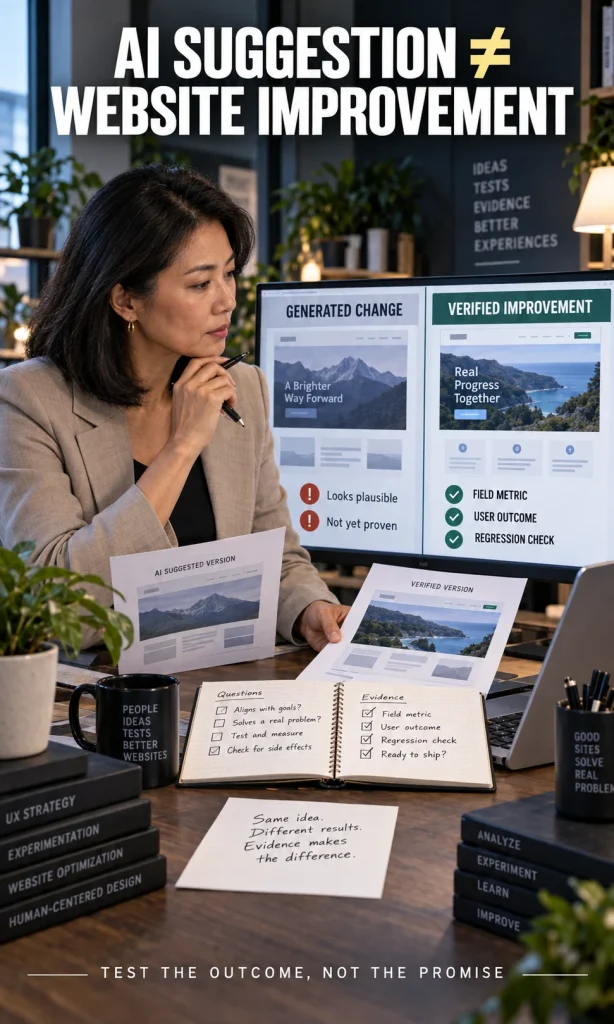
AI systems improve websites most reliably when they shorten the cycle from evidence to action: finding a problem, proposing a change, testing it, and measuring the result. They can help with content, code, performance, search visibility, accessibility checks, personalization, support, and analytics, but an AI suggestion is not the same thing as a verified improvement. The strongest workflow keeps a measurable baseline, a human review point, and a rollback path before changes reach real users.
That distinction matters because website enhancement is not one job. A page can look cleaner while loading more slowly, rank for more queries while satisfying users less well, or become more personalized while creating privacy and consistency problems. AI becomes useful when it is assigned a specific website problem and judged by the metric that problem actually affects.
| Website job | What AI can do well | What proves it worked | Human checkpoint |
|---|---|---|---|
| Content and information architecture | Cluster topics, summarize research, draft variants, identify missing questions | Query coverage, engagement, conversions, editorial usefulness | Accuracy, originality, experience, source quality, cannibalization |
| UX and conversion | Find friction patterns, propose variants, segment feedback | Task completion, conversion, abandonment, support demand | Test design, accessibility, dark patterns, business constraints |
| Performance and code | Explain traces, suggest refactors, flag costly scripts, generate test cases | Field performance, errors, Core Web Vitals, regression rate | Code review, staging, browser/device tests, rollback readiness |
| Accessibility | Triage obvious issues, generate descriptions, inspect patterns | Manual and automated evaluation against applicable requirements | Keyboard, screen-reader, cognitive and real-user evaluation |
| Search and discovery | Analyze query families, technical issues and content gaps | Search Console trends, indexed coverage, qualified visits, conversions | People-first quality, technical eligibility, overlap and spam risk |
Where AI actually improves a website
The useful question is not whether a website should “use AI.” The useful question is which stage of the website workflow contains enough repetitive analysis, variation, or pattern recognition for AI to reduce effort without weakening judgment. That usually means starting with diagnosis and assisted production before moving toward autonomous changes.
- Research and diagnostics: AI can summarize analytics notes, group recurring support problems, compare crawl findings, classify feedback, and help a team see patterns faster.
- Content operations: AI can support outlines, source synthesis, metadata variants, content inventories, internal-link suggestions, and editorial QA when a human still owns accuracy and usefulness.
- Design and UX: AI can generate interface alternatives, classify usability feedback, suggest form simplifications, and help teams turn behavioral evidence into testable hypotheses.
- Development: AI can explain unfamiliar code, propose refactors, generate tests, document components, and accelerate debugging, provided changes are reviewed and tested before deployment.
- Performance: AI can help interpret traces and prioritize suspected causes, but field measurements still decide whether the page became faster for real users.
- Accessibility: AI can assist with issue discovery and remediation ideas, but it cannot replace knowledgeable evaluation of actual conformance and usability.
- Search visibility: AI can help organize research and technical checks, but it does not create a separate shortcut around useful content, crawlability, indexing, and established SEO practices.
If your team already uses an AI workflow automation system, website enhancement is a good place to apply the same discipline: define the input, define the expected output, keep a review gate, and measure what changed. That is also the point where the difference between automation and judgment becomes visible, especially when deciding when not to use AI for a sensitive or poorly measured change. A fast AI workflow is only an improvement if the website outcome can be verified.

Use AI to improve a measured problem, not to guess at one
The most common implementation mistake is starting with the AI capability instead of the website problem. A team buys an AI product, turns on automated suggestions, and then searches for places to use them. The safer sequence is the reverse: identify a costly friction point, capture a baseline, decide which part of the work AI can accelerate, then run a controlled change.
For example, suppose a product page has high traffic but weak completion on a comparison step. AI can cluster session notes, summarize user feedback, propose clearer labels, and produce alternative layouts, but the business still needs a test that distinguishes a better experience from a merely different one. If the change increases conversion while increasing complaints, returns, or accessibility barriers, the website has not actually improved.
AI for content: speed is useful, commodity output is not
Generative AI can reduce the time required to organize research, create first drafts, compare source material, normalize formatting, and produce variations for testing. The risk appears when production speed becomes the objective and the site starts publishing many interchangeable pages with little original experience, analysis, evidence, or editorial value. Google’s guidance on using generative AI content on websites focuses on accuracy, quality, relevance, and avoiding scaled content that adds little value.
A better use of AI is to make strong human material easier to use. That may mean converting expert notes into a cleaner decision table, identifying unanswered questions in an interview, finding terminology inconsistencies, or generating alternative explanations that an editor can verify. If you need a broader view of practical applications, the site’s guide to AI use cases helps separate useful functions from vague “AI-powered” claims.
AI for search: foundational SEO still matters
AI search features have changed how information is discovered, but they have not eliminated the technical and editorial foundations of search visibility. Google’s current guide to optimizing for generative AI features in Search states that established SEO practices remain relevant, and that website owners do not need special “AEO” or “GEO” hacks to become eligible for Google’s generative search experiences. Crawlability, indexability, useful non-commodity content, clear site structure, strong images, and satisfying pages still do the underlying work.
This changes how AI should be used inside an SEO workflow. It is useful for query clustering, content-gap analysis, technical triage, title alternatives, internal-link review, and synthesis of Search Console findings, but it should not be allowed to invent demand, create thin pages for every query variant, or treat third-party “AI visibility scores” as if they were Google metrics. Use the model to accelerate analysis, then validate decisions with first-party search data and the actual page experience.
AI for performance: measure field results, not just generated code
AI coding assistants are good at turning a performance trace into hypotheses, spotting expensive patterns, explaining unfamiliar JavaScript, and proposing smaller implementations. They are less reliable at knowing how a change behaves across your real traffic mix, devices, plugins, ad stack, consent layer, and caching system. Every performance change therefore needs before-and-after measurements in the environment where users actually experience it.
For Core Web Vitals, the current field-oriented targets are LCP at 2.5 seconds or less, INP at 200 milliseconds or less, and CLS at 0.1 or less at the 75th percentile of page loads. The web.dev Core Web Vitals guidance emphasizes real-user experience across loading, responsiveness, and visual stability, which is exactly why an AI-generated refactor should be treated as a hypothesis until field data confirms the gain. A faster Lighthouse run is useful evidence, but it is not a substitute for production behavior.
AI for accessibility: automation can assist, but it cannot certify the experience
Accessibility is a strong example of where AI can be helpful without being authoritative. It can flag missing alt text, suggest clearer labels, detect some contrast problems, summarize repeated component issues, and help developers draft fixes. The W3C Web Accessibility Initiative explicitly notes that no tool alone can determine whether a site is accessible, so automated or AI-assisted checking must be paired with knowledgeable human evaluation.
That means an AI “pass” should never be treated as proof of conformance. Teams still need to test keyboard behavior, focus order, labels, error handling, responsive states, assistive-technology behavior, and the usability of important flows. AI can reduce the amount of obvious work that reaches manual review, but the manual review remains part of the definition of done.
AI personalization can help – but only with strong data boundaries
Personalization can be valuable when a site has enough traffic and useful first-party signals to distinguish meaningful patterns from noise. AI can help choose content order, adapt recommendations, prioritize support paths, or change messaging based on context, but the design should remain understandable when personalization is wrong or unavailable. Sensitive inference, opaque targeting, and excessive data collection create a much larger risk surface than a normal content experiment.
Before expanding personalization, document what data the system can use, how long that data is kept, what the model is allowed to infer, and which experiences must remain consistent for every user. This is where broader AI trust and uncertainty principles become operational rather than theoretical. The more consequential the outcome, the more important it is to keep a human accountable for the rule, the exception, and the fallback experience.
Agents can operate parts of a website workflow, but autonomy should be earned
Agentic systems can move beyond suggestions and perform actions such as opening issues, updating tickets, generating drafts, changing structured data, running tests, or preparing deployment pull requests. That can save substantial time, but it also changes the failure mode because the AI is no longer only advising a person. A mistaken action can propagate before anyone notices unless permissions, staging, approvals, and audit logs are designed into the workflow.
The safest pattern is progressive autonomy. Start with read-only analysis, move to draft-and-review actions, then allow narrowly scoped changes with explicit approval or automated rollback criteria. If you are comparing the underlying approaches, agentic AI vs generative AI explains why an action-taking system needs different controls from a system that only produces content.
A practical 30-day AI website enhancement workflow
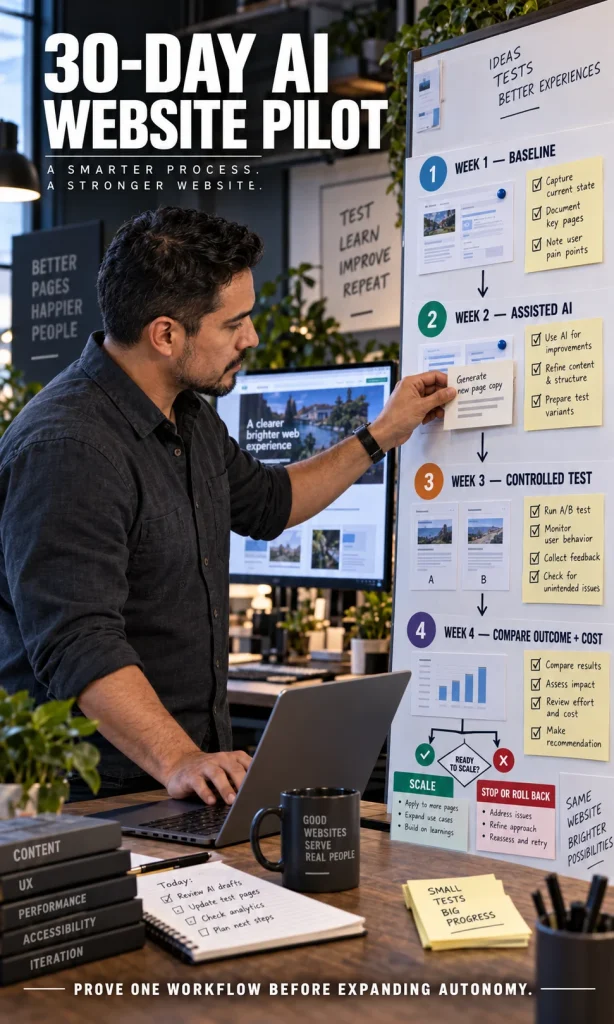
You do not need to transform the entire site at once. A four-week pilot is usually enough to learn whether a specific AI-assisted workflow is worth keeping, because it forces the team to define the baseline, limit the scope, and collect evidence before scaling. The point is not to prove that AI can produce an output; it is to prove that the output improves a website outcome without creating a larger problem elsewhere.
- Week 1 – Baseline the problem. Choose one measurable issue such as slow interactions, weak form completion, repetitive support demand, content QA backlog, or accessibility defects. Record the current metric and the current human workflow.
- Week 2 – Use AI in assisted mode. Let the system analyze, draft, classify, or propose changes, but keep every decision behind human review. Record where the AI saves time and where it creates rework.
- Week 3 – Run one controlled experiment. Ship the smallest change that can test the hypothesis. Keep a rollback path, watch error and complaint signals, and avoid changing several unrelated variables at once.
- Week 4 – Compare outcome and operating cost. Check the target metric, QA burden, maintenance cost, false positives, and any new risks. Scale only the part of the workflow that produced a measurable net gain.
What to measure before you automate more
The right metric depends on the job. A content workflow may be judged by editorial cycle time plus reader outcomes, while a checkout change may need conversion, error rate, abandonment, support contacts, and accessibility validation. Using one broad “AI performance” score hides those differences and makes weak automation look more successful than it is.
| AI-assisted change | Primary evidence | Watch for |
|---|---|---|
| Content production | Editorial time, usefulness, search/query coverage, conversions | Hallucinations, sameness, overlap, source errors |
| UX personalization | Task completion, conversion, retention | Bias, privacy, confusing inconsistency, filter bubbles |
| Code changes | Regression tests, errors, field performance | Security issues, dependency mistakes, brittle edge cases |
| Support automation | Resolution rate, escalation quality, satisfaction | Confident wrong answers, dead ends, missing human handoff |
Build governance into the workflow, not around it later
As website AI moves from low-risk drafting toward personalization, automated publishing, customer support, or action-taking agents, governance becomes part of normal product engineering. NIST’s AI Risk Management Framework is designed to help organizations incorporate trustworthiness considerations into the design, development, use, and evaluation of AI systems. For a website team, that translates into practical controls such as scoped permissions, provenance, testing, incident ownership, data boundaries, human oversight, and documented rollback procedures.
You do not need a large governance program for every AI-assisted task. A content outline generator can use a lightweight review checklist, while an agent that can publish, change prices, alter eligibility information, or handle sensitive customer data needs stricter controls. The general rule is simple: the more costly or difficult the failure is to reverse, the less autonomy should be granted without evidence.
How to decide whether a website workflow is ready for AI
A workflow is a strong AI candidate when it is frequent enough to matter, measurable enough to evaluate, reviewable enough to catch mistakes, and recoverable enough to undo a bad result. It also needs data controls that match the sensitivity of the information involved. If one of those conditions is missing, improve the workflow first instead of automating a weak process.
The decision can be made without predicting an abstract AI “readiness score.” Define the bottleneck, capture the baseline, identify what the model is allowed to do, and decide what evidence would justify the next level of autonomy. The interactive experience below turns those conditions into a practical first experiment rather than a generic list of AI features.
Choose one measurable website problem
Website AI Upgrade Studio
Turn your current bottleneck into a bounded AI experiment with a baseline, a human checkpoint, and a scale-or-stop rule.
2. Your bounded first experiment
Start with assisted analysis
Capture this before the AI-assisted change so the result can be judged against reality.
Keep the model inside this bounded role during the first pilot.
This review must happen before the change reaches real users.
30-day pilot
Scale only when
Stop or roll back when
This experience provides workflow guidance, not a guarantee of search rankings, accessibility conformance, security, conversion gains, or regulatory compliance.
Frequently asked questions
Can AI automatically redesign a website better than a human team?
AI can generate layouts, copy, components, tests, and improvement ideas quickly, but “better” still depends on user needs, technical constraints, accessibility, brand requirements, and measurable outcomes. Treat AI-generated redesigns as testable proposals rather than automatic upgrades. Human review becomes more important as the change affects revenue, trust, privacy, or difficult-to-reverse systems.
Does using AI-generated content hurt SEO?
AI assistance is not automatically a search problem. Google’s guidance focuses on whether content is accurate, useful, original enough to add value, and produced for people rather than at scale primarily to manipulate rankings. The risk is low-value automation, not the mere fact that AI helped with the work.
Can AI improve Core Web Vitals?
AI can help identify suspected causes, explain traces, propose code changes, and generate tests, but the improvement has to be measured. Use field performance and relevant lab diagnostics before and after the change, then keep the change only if it improves the intended metric without creating regressions elsewhere.
Can AI make a website WCAG compliant by itself?
No automated system can establish complete accessibility on its own. AI can help detect and remediate some issues, but W3C guidance still calls for knowledgeable human evaluation because many accessibility requirements depend on interaction, context, assistive technology, and real user experience. Use automation as triage, not certification.
What is the safest first AI website project?
Start with a frequent, measurable, reversible workflow where AI can assist without publishing or acting autonomously. Good examples include classifying support feedback, summarizing analytics findings, drafting test variants, checking content consistency, or explaining performance traces. Once the team can measure the gain and understand the failure modes, it can decide whether more autonomy is justified.
The practical takeaway
AI is changing website enhancement by making analysis, iteration, production, and testing faster, but the real advantage is not automation for its own sake. The durable workflow is baseline -> AI assistance -> human verification -> controlled release -> measured result, with stronger controls as consequences increase. If a website team keeps that sequence intact, AI can expand what it can test and improve without turning the site into an uncontrolled experiment.