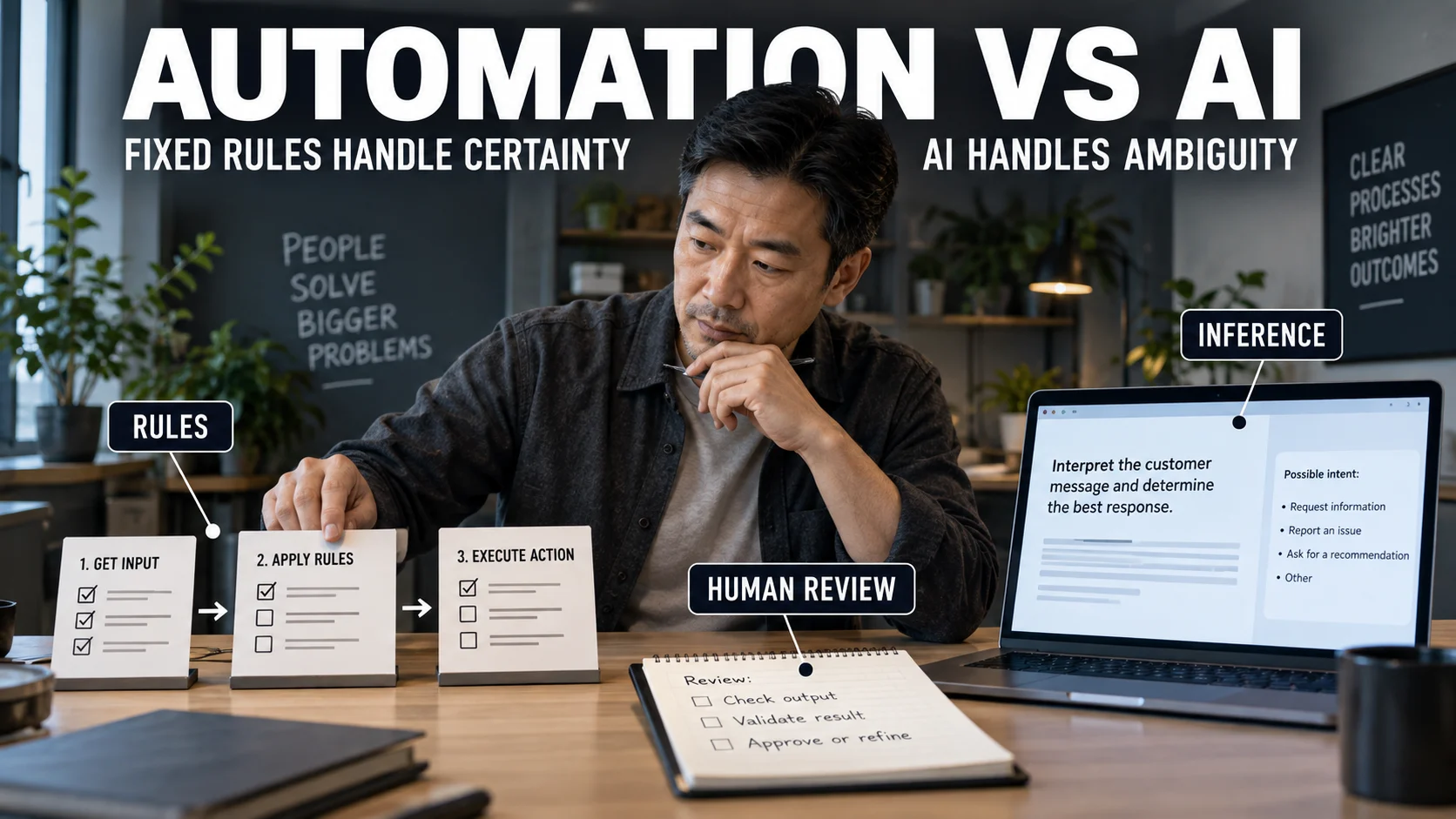

Automation follows a path people define in advance; artificial intelligence uses a model to infer, classify, predict, generate, or choose when the answer cannot be fully written as fixed rules. The useful decision is not which technology is “smarter,” but where a workflow stops being deterministic and starts requiring interpretation under uncertainty. In many production systems, the strongest design is a hybrid: deterministic automation around one or more tightly bounded AI steps.
| Decision factor | Automation | Artificial intelligence | What it means in practice |
|---|---|---|---|
| Core logic | Explicit rules, conditions, states, or sequences | Model inference from learned statistical patterns | Use rules when the correct path is knowable before execution. |
| Best input | Structured and predictable | Variable, ambiguous, or unstructured | Text, images, speech, and messy documents are common AI entry points. |
| Output behavior | Repeatable when the same rules and data apply | Probabilistic or context-dependent | AI needs evaluation across representative cases, not only branch testing. |
| Exceptions | Must usually be anticipated or routed | Can interpret unfamiliar variation, but can still be wrong | Flexibility is useful only when error controls match the consequence. |
| Testing | Verify rules, states, edge cases, and retries | Measure quality, failure patterns, reliability, drift, and recovery | The test method should match the system type. |
The distinction is narrower than “machines that think” versus “machines that repeat.” The OECD definition of an AI system emphasizes inference from inputs to generate predictions, content, recommendations, or decisions, while the NIST AI glossary likewise describes machine-based systems that produce predictions, recommendations, or decisions for defined objectives. Automation, by contrast, is the broader act of making a process execute automatically; an automated process may use ordinary rules, AI, or both.
Automation models a procedure; AI models uncertainty inside a procedure
A traditional automation system is strongest when the desired behavior can be stated before the run begins. “If an approved invoice has all required fields, post it to the ledger and notify the owner” is automation because the trigger, validation rules, action, and exception route can all be defined explicitly.
An AI step becomes useful when one of those inputs cannot be handled economically with fixed rules. A model might extract fields from invoices with changing layouts, classify a free-form support request, detect a visual defect, summarize a long case file, or propose the next relevant category. The surrounding workflow can remain deterministic even though one step uses probabilistic inference.
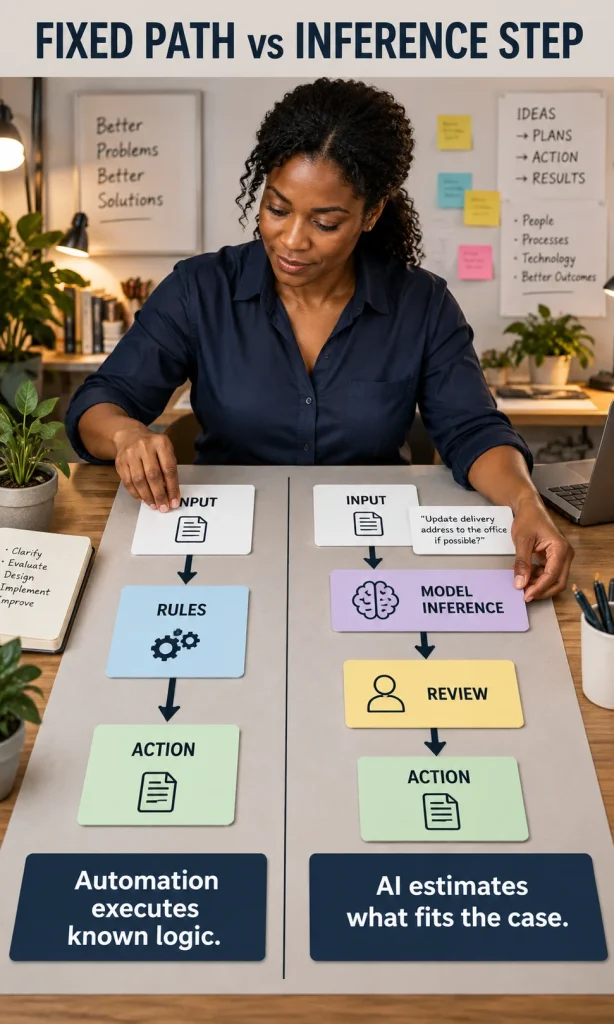
Why “AI learns, automation does not” is too simple
That slogan is useful for beginners, but it is not a reliable architecture rule. Many deployed AI systems do not learn continuously from every interaction; they perform inference using a model that was trained earlier, and updates may happen only through a controlled retraining or model-replacement process. Likewise, automation can be extremely sophisticated without containing any AI at all.
The better distinction is whether the software is executing explicit logic or using a learned model to infer an output. That framing also explains why AI agents and automation should not be treated as direct substitutes: an agent may choose steps dynamically, while a workflow can keep state, permissions, retries, approvals, and irreversible actions under explicit control.
Five questions tell you which approach fits
Start with the work, not the technology name. These five questions usually reveal whether you need conventional automation, a bounded AI step, or a hybrid workflow.
- Can the correct rules be written before execution? If yes, deterministic automation is usually the first choice.
- Are the inputs structured and stable? Forms, database fields, status values, and known APIs favor automation; variable text, images, speech, and mixed documents create a stronger case for AI.
- Should the same valid input produce the same operational action? If consistency is the requirement, keep the decision in explicit logic whenever possible.
- How costly is a wrong output? Higher consequence demands stronger validation, narrower AI authority, human review, or a deterministic stop condition.
- Does the next step depend on context that cannot be enumerated economically? If the route itself changes with evidence, an AI-assisted or bounded agentic design may be justified.
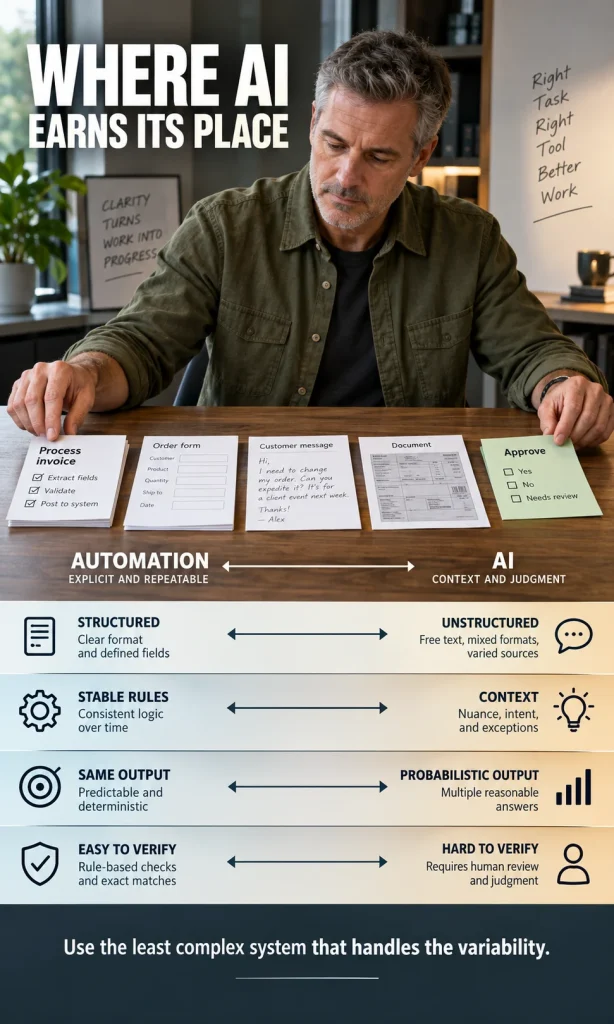
| Workflow condition | Prefer | Why |
|---|---|---|
| Stable rules + structured data + predictable action | Automation | Faster to test, easier to audit, lower variance. |
| Known process + one ambiguous interpretation step | AI-assisted workflow | The model handles ambiguity while the workflow controls the process. |
| Variable path + changing context + reversible actions | Bounded adaptive AI | Dynamic planning can add value if tools, permissions, and stop conditions are constrained. |
| High consequence + weak review + hard-to-verify output | Human-led with AI support | The model can assist, but should not own the final consequential decision. |
Try the Workflow Fit Studio
The quickest way to use this distinction is to classify one real workflow. The experience below asks about input structure, rule stability, judgment, consequence, review, and reversibility, then returns an architecture direction without inventing a score.
Workflow Fit Studio
Classify one real workflow by rules, inputs, judgment, consequence, review, and reversibility.
Why this fits
Keep these controls
Your browser blocked the report window. Allow pop-ups for this page and try again.
How automation and AI combine in real work
Invoice processing
If an invoice arrives through a controlled form with validated fields, ordinary automation can route it, check required values, post data, and notify the right person. If invoices arrive as scans, PDFs, photos, or different supplier layouts, AI can extract candidate fields first; deterministic rules should still validate totals, supplier identity, approval limits, and posting conditions before money moves.
Customer support
A workflow can assign queues, enforce service-level timers, retrieve account status, and log every state change. AI can interpret the customer’s free-form message, classify intent, summarize history, or draft a reply. Account changes, refunds, access permissions, and other consequential actions can remain behind explicit rules or approval gates.
Operations and maintenance
A scheduled backup, threshold alert, retry sequence, or patch window is conventional automation. AI becomes relevant when the task is to interpret an unusual log pattern, classify an image, compare several possible causes, or propose a remediation path. The final action can still be executed through deterministic controls that record what changed and allow recovery.
That layered design is why AI workflow automation systems often work best when the workflow remains the control plane. The AI step contributes interpretation; the automation layer contributes state, permissions, reproducibility, and auditability.
Why replacing known logic with AI can make a system worse
AI is not automatically an upgrade for a rule that already works. Moving a stable, testable branch into a model can add latency, cost, output variance, monitoring requirements, and failure modes that did not exist before. The model may also produce a plausible answer when the correct behavior is simply to stop because a required condition is missing.
The NIST AI Risk Management Framework treats AI reliability, safety, accountability, transparency, and evaluation as lifecycle concerns. In practical workflow design, that means the more consequential the output, the more important it is to define validation, permissions, review, logging, and recovery around the model rather than trusting “intelligence” as a substitute for controls.
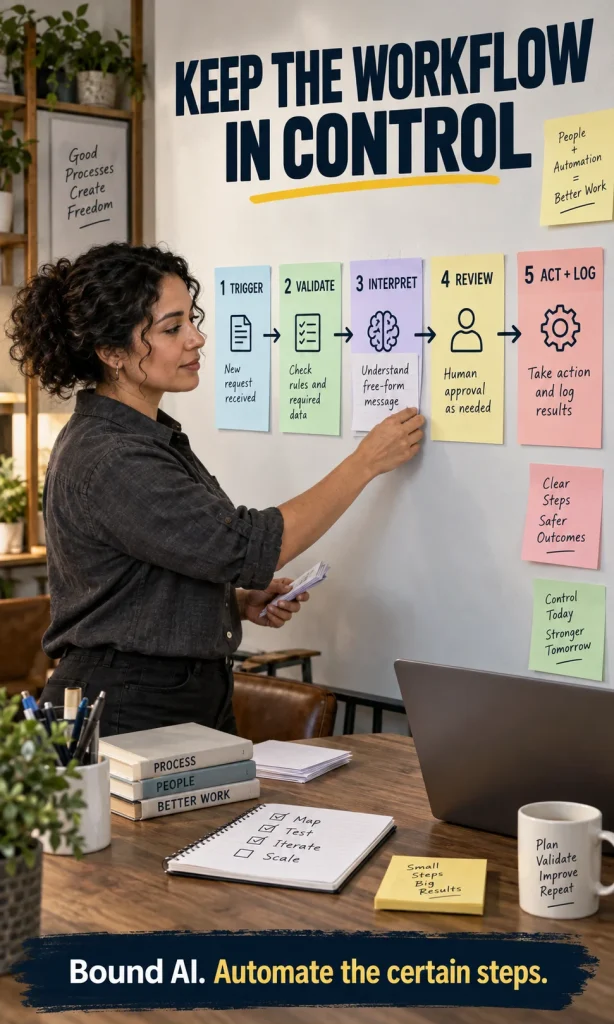
Keep the workflow in control
A reliable hybrid pattern is simple: deterministic steps handle triggers, permissions, validation, and irreversible actions; AI handles the bounded point where interpretation is genuinely needed. This also makes failure easier to diagnose because you can tell whether the problem came from a rule, a model inference, bad input, or an action layer.
- Trigger: define the event that starts the workflow.
- Validate: check required data, permissions, limits, and preconditions with explicit logic.
- Interpret: send only the ambiguous step to AI, with a narrow task and expected output format.
- Review or verify: use a person, deterministic check, second system, threshold, or policy gate appropriate to the consequence.
- Act and log: let automation perform the approved action, record the result, and provide a recovery path.
Human problem solving is broader than either technology
Automation can reproduce a procedure and AI can approximate parts of perception, classification, prediction, language, or planning. Human problem solving also includes deciding which objective matters, recognizing when the frame is wrong, negotiating conflicting values, using tacit situational knowledge, and accepting responsibility for consequences. Those parts do not disappear because software can generate a convincing answer.
This is why AI versus human decision making is best treated as a task-allocation question rather than a contest. The right design assigns each part of the job to the mechanism that can perform it with the required reliability, evidence, control, and accountability.
A practical implementation sequence
Before buying an “AI automation” platform or building an agent, map the decision points in one workflow. The goal is to make each boundary explicit enough that you know which parts should be deterministic, which parts need model inference, and where a person still needs authority.
- Map the current process. Record inputs, decisions, actions, exceptions, and owners.
- Automate the certain steps first. Stable rules are usually cheaper and easier to validate than model behavior.
- Isolate the ambiguity. Identify the exact step that requires language understanding, classification, prediction, generation, or adaptive planning.
- Define acceptable failure. Decide what happens when the model is uncertain, wrong, unavailable, or outside scope.
- Test representative cases. Evaluate normal cases, edge cases, adversarial inputs, missing data, and the situations that matter most operationally.
- Monitor and recover. Log model outputs and actions, preserve human override where needed, and keep a rollback or exception path.
For a deeper explanation of how AI reaches outputs, see how AI makes decisions. If the question is specifically whether a system should be allowed to choose tools and steps dynamically, continue with what agentic AI is.
Frequently asked questions
Is automation the same as artificial intelligence?
No. Automation means a process runs automatically; it can be built entirely from fixed rules. AI is a class of techniques that uses model inference to produce outputs such as classifications, predictions, recommendations, generated content, or decisions. An automated process may use AI, but it does not have to.
Does AI always learn after every interaction?
No. Many deployed AI systems use a fixed model for inference and do not update themselves from every user interaction. Learning may happen during separate training, fine-tuning, or model-update processes under controlled conditions.
Can normal automation make decisions?
Yes, if the decision can be expressed as explicit rules. A workflow can approve, reject, route, calculate, retry, stop, or escalate based on known conditions without using AI.
What is intelligent automation?
Intelligent automation combines conventional automation with AI capabilities. A common pattern is for AI to interpret unstructured input while deterministic workflow logic validates, routes, approves, records, and executes the operational steps.
When is AI better than automation?
AI is more useful when the task contains ambiguity that fixed rules cannot handle economically, such as interpreting natural language, images, variable documents, patterns, or changing context. It is not automatically better for stable, repeatable rules.
Should AI agents replace workflow automation?
Usually not. Agents are useful when the path itself must adapt during execution, but deterministic workflows remain valuable for permissions, validation, retries, approvals, records, and irreversible actions. The least autonomous design that solves the variability is often easier to test and govern.
The bottom line
Automation is the right default when the process is knowable; AI earns its place where the workflow contains uncertainty that must be interpreted rather than merely executed. Treat them as layers, not rivals: use deterministic logic for certainty and control, bounded AI for ambiguity, and human judgment where consequence, accountability, or context requires it.