Dynamics 365 Sales Hub and Dynamics 365 Sales Professional can look like two versions of the same CRM, which is why the terminology causes so much confusion. Both applications can manage accounts, contacts, leads, opportunities, activities, products, quotes, orders and related sales information, but they sit behind different Dynamics 365 Sales licensing paths. The most important distinction is that Sales Hub is the principal out-of-the-box application used with Sales Enterprise and Sales Premium, while the Sales Professional app is intended for users licensed for Dynamics 365 Sales Professional.
That means “Sales Hub vs Sales Professional” is not quite the same comparison as “Sales Enterprise vs Sales Professional.” Sales Hub is an application experience, while Enterprise and Professional are licensing levels that determine which application and capabilities a user is entitled to access. Microsoft’s Dynamics 365 Sales licensing and storage FAQ makes this explicit by stating that users can use Sales Hub or Sales Professional according to their license and should not use the application that is not included in their entitlement, even if both appear in an environment.
If your main concern is subscription cost, feature tiers and whether Professional, Enterprise or Premium is worth the additional spend, the Dynamics 365 Sales pricing guide owns that decision in greater detail. If you are still trying to understand where modern Microsoft CRM fits within Dataverse and the older Dynamics CRM terminology, Microsoft Dynamics CRM cloud and Dynamics 365 Sales explains that platform transition. This page focuses much more narrowly on what actually changes when your organization works in Sales Professional instead of Sales Hub.
The Short Answer: Sales Hub Is the Broader Enterprise Sales App
Sales Hub is Microsoft’s main first-party Dynamics 365 Sales application for the Enterprise and Premium licensing path. Microsoft’s current Sales Hub guidance describes it as a preinstalled application containing core and premium sales capabilities and specifically recommends using Sales Hub unless an organization has sales practices unusual enough to justify a custom application. It is designed to become the primary working environment for sellers, sales managers and administrators using the broader Dynamics 365 Sales platform.
Sales Professional is a separate application designed around a more standardized sales process. Microsoft’s system requirements for Sales Hub and Sales Professional describes Sales Professional as including features and configurations intended to help small and midsized organizations manage sales processes effectively. The important word is not “small,” however, because process complexity matters more than company headcount when deciding whether the Professional architecture is enough.
The two applications therefore share considerable CRM functionality while differing in the depth of the surrounding platform. Sales Professional can be a very capable sales application when the organization mainly needs core customer and opportunity management. Sales Hub becomes much more important when forecasting, advanced sales engagement, premium intelligence, extensive customization and the larger Enterprise or Premium feature set are part of the implementation.
Sales Hub vs Sales Professional at a Glance
| Decision area | Sales Professional app | Sales Hub app |
|---|---|---|
| Primary license path | Dynamics 365 Sales Professional | Dynamics 365 Sales Enterprise and Sales Premium |
| Core lead and opportunity management | Yes | Yes |
| Accounts, contacts and activities | Yes | Yes |
| Quotes, orders and invoices | Core sales process supported | Core sales process supported with broader enterprise capabilities around it |
| Forecasting | More limited licensing position | Designed for Enterprise and Premium forecasting capabilities |
| Sales Accelerator | Not the main Professional experience | Available according to Enterprise/Premium licensing and applicable capacity |
| Predictive scoring | Not positioned as a core Professional capability | Available according to Enterprise/Premium entitlement and capacity |
| Conversation intelligence | Not part of the same enterprise feature model | Available within the Enterprise/Premium digital-selling model |
| Customization direction | Designed around a more standardized application | Broader customization and enterprise application architecture |
| Best starting fit | Core CRM with relatively standardized sales processes | Complex sales processes, forecasting, intelligence, engagement and deeper customization |
The practical difference becomes much clearer once a company moves beyond account and opportunity management. A seller entering a lead or updating an opportunity can perform similar work in either application, so a basic demonstration may make the products seem nearly interchangeable. The distinction becomes more important as management expects advanced forecasting, administrators build sophisticated automation and sellers begin relying on sequences, intelligence and prioritized work.
Sales Hub Is an App, Not a Separate Dynamics 365 License
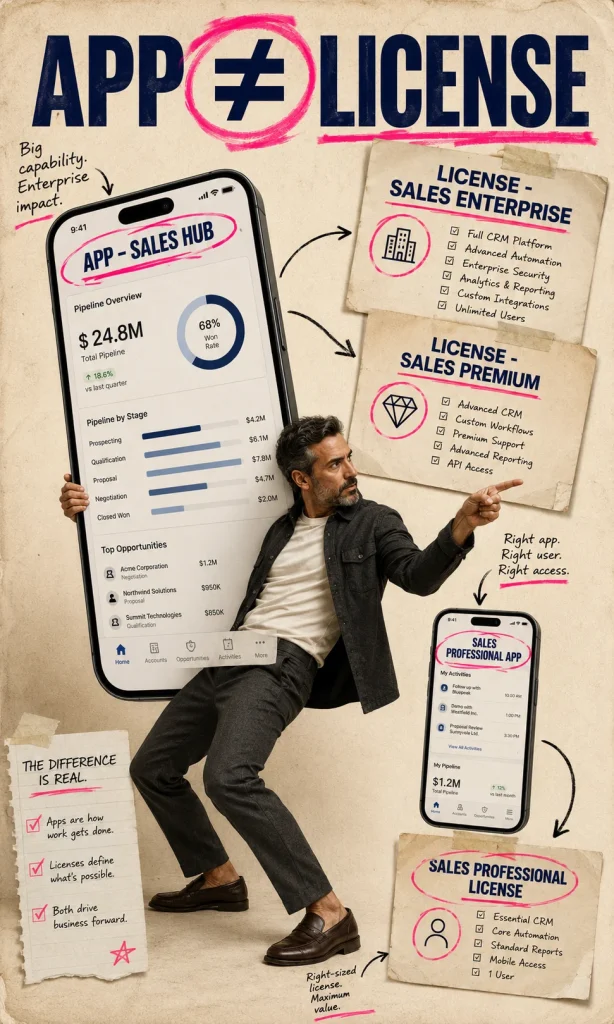
This distinction is worth making explicit because search results and Microsoft administration screens can mix application names and license names in the same conversation. Sales Hub is the application users open, while Sales Enterprise or Sales Premium is the license that provides the entitlement behind that application. Sales Professional is confusing because Microsoft uses “Professional” in both the license name and the corresponding application name.
Microsoft’s basic Dynamics 365 Sales user guidance tells users to select either Sales Hub or Sales Professional depending on their Dynamics 365 Sales license. This is why a seller may ask an administrator which version of CRM they have even though both teams say they are using “Dynamics 365 Sales.” The license determines which out-of-the-box application should be used.
The distinction becomes important during procurement because a buyer should not compare “Sales Hub price” with “Sales Professional price.” There is no separate Sales Hub subscription sitting beside Professional as though the two apps were standalone products. The correct commercial comparison is Professional versus Enterprise or Premium, while the application comparison is Sales Professional versus Sales Hub.
Which Licenses Use Sales Hub?
Sales Hub is associated with the Enterprise and Premium side of Dynamics 365 Sales. Microsoft’s current Dynamics 365 Sales security-role documentation identifies Sales Enterprise and Sales Premium users with access to the Sales Hub application, while Professional users receive the Professional-specific sales roles and application experience. This aligns the app itself with the licensing architecture that enables the broader sales capabilities.
Premium does not introduce a separate “Sales Premium app” for ordinary seller work. Instead, Premium builds on the Sales Hub environment and unlocks deeper intelligence and engagement capabilities through the appropriate license. Enterprise users can also access selected Premium-style digital selling capabilities within specified usage limits.
This matters because moving from Enterprise to Premium is largely an expansion of capability within the same broad application model. Moving from Professional to Enterprise is more structural because the organization crosses from the Professional-specific application into Sales Hub and the wider Enterprise feature architecture. The second change therefore deserves more implementation attention than a simple price increase might suggest.
Which License Uses the Sales Professional App?
The Sales Professional app is specifically associated with the Dynamics 365 Sales Professional license. Microsoft’s Sales Professional installation guidance tells administrators to install the Professional application in a Power Platform environment with Dynamics applications enabled and warns that Sales Hub should be hidden when it appears because Sales Hub applies to enterprise licensing. That instruction removes much of the ambiguity around which application Professional users are supposed to operate.
Professional users can still manage serious sales activity. Microsoft’s training for Dynamics 365 Sales Professional includes customer management, accounts, contacts, leads, opportunities, tasks, appointments, email and phone calls. The license is therefore not a stripped-down contact book merely because the Enterprise application offers more platform depth.
The trade-off appears as requirements become more complicated. A company whose CRM gradually accumulates advanced forecasting, custom applications, extensive automation or sophisticated sales-engagement requirements can reach the point where Professional begins constraining architecture. At that stage the correct decision may be to move to Enterprise rather than continuing to stretch the Professional application beyond the reason it was chosen.
Can a Sales Professional User Open Sales Hub?
Microsoft says no as a licensing rule. The Dynamics 365 Sales licensing FAQ states that Sales Hub and Sales Professional are licensed separately and that a user should use only the application included with the assigned license, even when another app is visible in the environment. Visibility is therefore not proof of entitlement.
This is an important administrative distinction because Power Platform environments can sometimes display applications that the current user is not licensed to use. An organization should not design access around what happens to be visible in the application picker. Security roles, application access and licensing all need to align.
The same principle works in the other direction. Giving an Enterprise or Premium user access to the Professional app does not transform the Professional experience into Sales Hub or make the environment architecture interchangeable. Users should work through the application intended for their license and implementation design.
Why Does Sales Hub Have More Enterprise Features?
Sales Hub is built to expose a wider set of Dynamics 365 Sales capabilities in one first-party application. Microsoft’s Sales Hub overview highlights forecasting, predictive scoring, Teams collaboration, premium capabilities, customization and a modern adaptive interface as reasons organizations use the app. The application is therefore intended to be more than a different navigation menu placed over the same Professional feature set.
Its broader role becomes particularly visible in sales intelligence. Enterprise users can access selected digital-selling features with capacity limitations, while Premium users receive a fuller entitlement to the corresponding advanced capability. Microsoft’s digital selling capabilities for Sales Enterprise includes Sales Accelerator, conversation intelligence, predictive scoring and relationship intelligence within that framework.
Sales Professional is deliberately narrower. That narrower scope can be an advantage when the business does not need the surrounding complexity because implementation and administration can remain focused on the essential CRM process. More capability is useful only when the sales organization actually has a reason to operate it.
Sales Accelerator Is One of the Clearest Sales Hub Differences
Sales Accelerator changes the seller experience from simply recording activities toward working from a prioritized queue. It can organize work around sequences, records and recommended next activities so sellers know which leads or opportunities deserve attention. This type of engagement architecture becomes especially useful in high-volume sales teams where manually deciding which record to work next consumes meaningful time.
Microsoft includes selected Sales Accelerator functionality in the Enterprise digital-selling entitlement with capacity limits. Premium expands the environment when the organization needs broader access to advanced engagement capability. This is one reason a buyer should not assume that only Premium users experience intelligent selling inside Sales Hub.
For a relationship-led team managing a modest number of strategic accounts, Sales Accelerator may be less decisive. Those sellers might spend far more time researching a small number of organizations than working through a high-volume queue. Feature value depends on the selling model rather than the impressive appearance of the interface.
Forecasting Pushes Many Organizations Toward Sales Hub
Forecasting is another area where Enterprise and Premium become more relevant. Microsoft’s current Sales security-role guidance assigns Forecast Manager and Forecast User roles to Sales Enterprise and Sales Premium, reinforcing that the richer forecasting architecture belongs to the Sales Hub licensing side. Managers can work with forecast configuration, adjustments, drill-down information and related pipeline analysis according to their permissions.
A small organization may already forecast effectively using conventional opportunity reporting outside the advanced forecasting system. In that situation, buying Enterprise solely because the word “forecasting” sounds important can create cost without improving the management process. The feature earns its value when the company’s actual forecast methodology benefits from the structure.
I would test forecasting using the organization’s normal management meeting. Build the hierarchy, categories, opportunity data and adjustments that leadership currently expects and see whether Sales Hub improves the process. That test is much more useful than checking whether a forecast page exists.
Predictive Scoring Is Not the Same as Ordinary Opportunity Management
Professional can manage opportunities without needing predictive scoring. The seller can update probability, close date, stage, revenue and related information through the standard sales process. Predictive scoring adds another layer by using available data to help prioritize leads or opportunities according to modeled likelihood and other signals.
Enterprise can use predictive scoring within documented digital-selling capacity, while Premium provides the broader premium entitlement. Microsoft’s current Enterprise digital-selling capacity comparison makes the distinction measurable rather than simply describing one tier as “smarter.” This can matter considerably in organizations processing high record volumes.
Predictive scoring should still be evaluated against data quality. If opportunities are routinely stale or important fields remain blank, a scoring model inherits the weakness of those records. Upgrading the application does not repair inconsistent sales discipline automatically.
Conversation Intelligence Belongs to the Broader Sales Hub Story
Conversation intelligence brings call and meeting analysis closer to the CRM process. Depending on the implementation and supported capabilities, organizations can use captured conversations to understand seller behavior, customer discussions and coaching opportunities. This gives managers another source of structured information beyond manually entered CRM notes.
The feature becomes useful when management has a process for using the information. Transcribing calls without changing coaching, qualification or account strategy can create large amounts of data without creating corresponding sales value. The license should therefore follow an operating behavior rather than enthusiasm for another dashboard.
Organizations also need to consider consent, privacy and legal requirements around call capture. The fact that a CRM supports analysis does not automatically make every recording scenario appropriate. Governance needs to be designed before wide adoption.
Sales Professional Still Covers the Core Lead-to-Invoice Process
The Professional label can make buyers assume that important transactional CRM features have been removed, which is not accurate. Microsoft’s current Sales security-role documentation describes the Sales Professional user role as providing access from lead through opportunity, quote, order and invoice, along with accounts, contacts and goals. That is a substantial end-to-end sales process.
For businesses selling relatively straightforward products or services, this can be enough to manage the commercial lifecycle effectively. Employees can track prospects, progress opportunities, maintain customer information and generate commercial records without adopting the enterprise intelligence layer. A disciplined standard process often benefits more from good adoption than from a larger feature inventory.
Professional becomes less comfortable when the business keeps adding exceptions. Multiple complex forecasting models, advanced engagement sequences, custom apps and broader enterprise automation can gradually turn the original Professional decision into a limitation. The signs usually appear in implementation workshops before they appear in licensing reports.
Customization Exists in Both Apps, but the Licensing Ceiling Is Different
Microsoft allows administrators to customize Dynamics 365 Sales applications using the model-driven application architecture. Its Sales application customization guidance describes editing tables, dashboards, forms, views, charts and business processes through the app designer without requiring conventional code for every change. The exact possibilities still depend on the assigned Dynamics license and broader Power Platform rights.
This is important because “Sales Professional cannot be customized” would be an inaccurate summary. Professional can be adapted, but its product and licensing model is intentionally more restricted than the Enterprise route. Enterprise becomes the stronger choice when customization itself is part of the long-term application strategy rather than a small collection of configuration changes.
The design should still resist unnecessary customization. Every new table, form, rule and flow becomes part of the production application that someone must maintain. Enterprise flexibility is valuable when it solves meaningful sales requirements, not when it gives the implementation team permission to reproduce every old CRM habit.
Sales Hub Can Be Customized Instead of Replaced
Organizations with unusual sales processes sometimes assume they need to build an entirely custom model-driven application. Microsoft’s Sales Hub versus custom application guidance recommends Sales Hub for faster time to value and encourages organizations to determine whether customization of the first-party app can satisfy the requirement before creating a replacement application. This can preserve Microsoft’s standard sales experience while still accommodating company-specific needs.
A custom application becomes more reasonable when the sales process differs substantially from the standard Sales Hub model. That could involve unusual navigation, highly specialized record types or user groups whose work would become cluttered by the normal Sales application. The decision should be based on user experience and lifecycle ownership rather than the appeal of starting from a blank screen.
Custom applications create documentation and support responsibility. Microsoft’s standard guidance, training and application updates are naturally centered around Sales Hub, which means organizations diverging significantly from it need to maintain more of their own operating knowledge. That cost should be part of the architecture decision.
Sales Hub and a Custom Sales App Can Coexist
Choosing Sales Hub does not prevent an organization from creating another application for a specialized group. Microsoft’s Sales Hub guidance explains that the first-party application can coexist with custom sales applications inside the broader environment. This can be useful when most sellers benefit from standard Sales Hub while a particular business unit needs a more focused experience.
The key is to avoid creating competing applications without clear boundaries. If two apps both modify the same opportunity information using different assumptions, users can quickly become uncertain about which process is authoritative. Separate interfaces should still share one coherent data and process model where appropriate.
A custom app also should not be used as a licensing workaround. The underlying Dynamics and Dataverse rights still apply regardless of how the interface is assembled. Application design cannot grant capabilities that the user’s license does not include.
The Environment Difference Matters More Than Many Buyers Expect
The earlier Dynamics 365 Sales pricing and licensing guide covers an important rule that buyers should carry into this comparison: Professional and enterprise-level Sales licensing cannot simply be treated as interchangeable applications inside one universal environment architecture. The distinction affects deployment planning, license assignment and the applications users are entitled to access.
This means a company should decide early whether Professional is a temporary starting point or the intended long-term CRM architecture. Beginning with Professional and later discovering that several departments require Enterprise can trigger more than a purchase-order change. Application and environment work can become part of the transition.
That does not mean organizations should buy Enterprise prematurely. It means the decision should consider the expected application roadmap rather than the first six months of use alone. Professional is strongest when the organization genuinely intends to remain close to the Professional operating model.
Can You Upgrade From Sales Professional to Enterprise?
Yes. Microsoft provides a documented upgrade path between Dynamics 365 Sales licenses, and its Dynamics 365 Sales license upgrade guidance describes purchasing the new subscription, assigning the appropriate license, installing the corresponding application and removing the previous solution when appropriate. The process therefore includes both licensing and application administration.
Microsoft’s guidance also warns that removing the previous solution can remove associated application modules and configuration elements such as site maps and form preferences. This means the transition should be tested in a controlled environment before administrators begin deleting Professional components from a production system. An upgrade should be treated as an application change rather than an accounting exercise.
Customizations deserve particular attention. Forms, views, automation and integrations built around the Professional implementation should be inventoried before the migration so the team understands what carries forward, what should be redesigned and what is no longer needed. A clean transition can also become an opportunity to remove old configuration that no longer creates value.
Upgrading the License Does Not Automatically Redesign the Sales Process
A company may buy Enterprise because Professional has become restrictive, but the new license does not automatically improve the application. Sellers will not suddenly use forecasting correctly, follow sequences or maintain better opportunities because Sales Hub now exposes more functionality. Implementation and adoption remain necessary.
This makes the upgrade an ideal point for a process review. Identify which Professional limitations actually created the business case, then configure the relevant Enterprise capabilities around those problems. Avoid turning on every new feature simply because the license allows it.
Training should focus on changed work rather than changed navigation. If sellers need to use prioritized work lists, forecasting or new qualification behavior, teach those operating changes in the context of real accounts and opportunities. Users care more about how the CRM affects their day than about which Microsoft tier was purchased.
Should a Small Business Use Sales Professional Instead of Sales Hub?
Small-company status alone is not enough reason to choose Professional. A 15-person sales organization can have complicated territories, long B2B buying committees, layered approvals and advanced prospecting processes that make Enterprise and Sales Hub a stronger fit. Another company with 150 sellers may operate a highly standardized process that Professional can support more economically.
Professional is better understood as a lower-complexity sales architecture. When the organization wants core CRM and can remain close to the standard process, the narrower application can reduce licensing expense and discourage unnecessary platform expansion. That simplicity can be strategically valuable.
Sales Hub becomes more attractive as sales complexity increases. Forecasting, high-volume engagement, richer intelligence, significant Dataverse extension and broader sales automation all push the design toward Enterprise or Premium. Headcount should be used to calculate cost after the architecture has been chosen, not to choose the architecture itself.
When Sales Professional Is the Better Choice
Sales Professional is a strong fit when sellers mainly need a dependable system for leads, customers, opportunities, activities, products, quotes and orders. The organization should be comfortable staying relatively close to Microsoft’s standard Professional experience and should not have a large roadmap of advanced sales-intelligence or custom-application requirements. In that situation, the narrower license can provide substantial CRM value without paying for a broader platform.
It is also attractive when simplicity itself is a project objective. CRM implementations frequently become difficult because every department wants to introduce another field, approval and automation layer. A more constrained application can help the organization maintain a disciplined operating model.
The warning sign is recurring frustration during design. If administrators repeatedly discover that the intended forecast, engagement, automation or application architecture belongs to the Enterprise side, Professional is no longer delivering simplicity. It is creating workarounds.
When Sales Hub Is the Better Choice
Sales Hub is the stronger fit when the organization expects Dynamics 365 Sales to become a significant enterprise application rather than a relatively narrow CRM. Forecasting, Sales Accelerator, predictive scoring, conversation intelligence, advanced customization and stronger alignment with broader Dataverse architecture all give Enterprise and Premium more room to grow. The app is also the environment around which Microsoft’s current Sales documentation and first-party seller experience are heavily centered.
Existing Power Platform capability strengthens that argument. An organization already governed around Dataverse, Power Automate and model-driven applications can often absorb Sales Hub into an architecture it already understands. The value comes from reusing platform capability rather than merely owning more Microsoft products.
Sales Hub is also the safer choice when the roadmap is already visibly complex. If future phases include advanced sales engagement, specialized apps, sophisticated forecasting and connected Dynamics processes, starting with Professional simply to upgrade later may add avoidable transition work. The decision should be driven by credible roadmap evidence rather than speculative future ambition.
Sales Hub Does Not Automatically Mean You Need Sales Premium
This distinction is just as important as the Professional comparison. Sales Enterprise users operate through Sales Hub and can access selected premium-style digital-selling capabilities with capacity limits. Premium expands that entitlement, but it does not create the Sales Hub application itself.
An organization can therefore decide that Sales Hub is necessary while still remaining on Enterprise. The Dynamics 365 Sales pricing guide examines where Enterprise capacity ends and Premium becomes worth the additional subscription cost. This avoids turning a simple app decision into an assumption that the most expensive plan is required.
I would separate those decisions during procurement. First decide whether the Professional or Sales Hub application architecture fits the process. Then decide whether Enterprise or Premium provides the appropriate intelligence and capacity inside the Sales Hub path.
How I Would Test Sales Professional Against Sales Hub
I would begin with the hardest ordinary opportunity your sales team manages. Recreate the account structure, stakeholders, activities, products, approvals, forecast expectations and post-win handoff in both environments. The objective is to discover where the Professional experience starts requiring workarounds rather than simply comparing navigation.
Next, test the manager’s workflow. Ask the manager to inspect pipeline quality, prepare the normal forecast, identify stale opportunities and understand which sellers need attention. Sales Hub’s additional value becomes much easier to judge when management work is included instead of demonstrating only the seller interface.
Finally, test one future requirement already present on the roadmap. That might be a sequence-driven prospecting process, predictive scoring, a custom model-driven experience or deeper Power Platform automation. Choosing Professional becomes much safer when the business knows the next important phase also fits within its intended architecture.
A Practical Sales Hub vs Sales Professional Decision Framework
Start with the sales process before looking at the application names. Identify whether the organization mainly needs standard lead-to-opportunity CRM or whether forecasting, intelligence, advanced engagement and extensive customization already appear in the required design. That first distinction often determines most of the answer.
Then evaluate the application roadmap. Professional can be an excellent long-term choice when the CRM is intentionally narrow, while Sales Hub becomes more attractive when the environment is expected to grow into a broader business platform. A roadmap containing several enterprise capabilities should not be ignored simply to reduce the initial license price.
Finally, evaluate operating capability. Sales Hub gives administrators more options, but more options also mean more configuration and governance. The organization should choose the application architecture it can maintain well rather than the one containing the largest number of features.
| If your requirement sounds like this… | Evaluate first |
|---|---|
| “We mainly need leads, accounts, contacts, opportunities, activities and quotes.” | Sales Professional |
| “We want to keep the CRM deliberately standardized.” | Sales Professional |
| “Managers need a richer forecasting environment.” | Sales Hub with Enterprise or Premium |
| “Sellers need prioritized work, sequences or advanced digital selling.” | Sales Hub |
| “Predictive scoring and conversation intelligence are part of the roadmap.” | Sales Hub with the appropriate Enterprise or Premium capacity |
| “We plan substantial Dataverse customization and custom applications.” | Sales Hub / Enterprise architecture |
| “Professional works now, but several Enterprise capabilities are already scheduled for the next phase.” | Model the upgrade before committing to Professional |
Which One Would I Choose?
I would choose Sales Professional when the sales process is genuinely standardized and the organization wants CRM to remain focused on core selling rather than becoming a broad application platform. It can support substantial lead-to-invoice work and may provide all the capability a disciplined sales organization needs. When Professional fits cleanly, paying for a larger architecture simply because Sales Hub looks more advanced provides little benefit.
I would choose Sales Hub when forecasting, digital selling, intelligence, custom applications and broader Dataverse architecture are already important parts of the requirement. Enterprise is often sufficient for organizations that need Sales Hub but do not require the complete Premium intelligence entitlement. Premium should then be evaluated separately according to usage and capacity rather than assumed from the choice of application.
The most useful way to think about the comparison is therefore simple. Sales Professional is the focused CRM path; Sales Hub is the broader enterprise sales application path. Choose according to the complexity you genuinely need to operate, because a narrow application full of workarounds and an enterprise application full of unused features are both expensive forms of poor fit.
Frequently Asked Questions
What is the difference between Dynamics 365 Sales Hub and Sales Professional?
Sales Professional is the out-of-the-box application associated with the Dynamics 365 Sales Professional license, while Sales Hub is the principal application used with Sales Enterprise and Sales Premium. Both support core CRM work, but Sales Hub participates in the broader enterprise feature set around forecasting, digital selling, intelligence and customization. The correct application therefore follows the license and sales-process architecture rather than personal interface preference.
Can Dynamics 365 Sales Professional users use Sales Hub?
Microsoft states that Sales Hub and Sales Professional are separately licensed applications. Users should use the application included with their assigned Sales license even when another application is visible in the environment. Application visibility therefore should not be treated as proof that a user is entitled to use Sales Hub.
Does Sales Enterprise use Sales Hub?
Yes. Sales Enterprise users work through the Sales Hub application and can access the Enterprise feature set for which they are licensed. Enterprise also provides selected premium digital-selling capabilities with defined capacity arrangements, so Sales Hub does not automatically mean that the organization must purchase Sales Premium.
Does Sales Premium have a different app from Sales Hub?
Sales Premium builds on the Sales Hub application rather than requiring sellers to use a completely separate Premium CRM interface. Premium mainly expands the capabilities and intelligence available within the broader Sales environment. This is why the Enterprise-versus-Premium decision should be evaluated separately from the Professional-versus-Sales Hub application decision.
Can Sales Professional manage quotes and orders?
Yes. Microsoft’s current Sales Professional role guidance includes access from lead and opportunity through quote, order and invoice, alongside accounts, contacts and goals. Professional can therefore support a substantial sales process even though it does not provide the same enterprise intelligence and application architecture as Sales Hub.
Can I upgrade from Sales Professional to Sales Enterprise?
Yes. Microsoft documents an upgrade process that includes purchasing the higher license, assigning it to users and installing the application appropriate to the new license. Administrators should test the transition carefully because removing the previous Sales solution can affect application modules and configuration such as site maps and form preferences.
Is Sales Hub better than Sales Professional for a small business?
Company size alone does not decide the application. A small sales team with complex forecasting, engagement, automation or customization requirements may benefit from Sales Hub, while a much larger team with a standardized process may be comfortable with Professional. The better decision is based on process complexity and roadmap requirements rather than employee count.
Should I customize Sales Hub or build a custom app?
Microsoft generally recommends beginning with Sales Hub and customizing it when the standard application can still support the sales process. A separate custom application becomes more attractive when a user group has sufficiently specialized navigation or workflow requirements to justify its own experience. Either approach still needs clear data ownership, security and lifecycle governance.